Spring Boot集成Redis与MongoDB实战配置
Redis 缓存服务接入流程
在工程内启用 Redis 能力,首要步骤是引入官方提供的起步依赖。该坐标已自动关联 Lettuce 客户端及连接池组件:
<dependency>
    <groupId>org.springframework.boot</groupId>
    <artifactId>spring-boot-starter-data-redis</artifactId>
</dependency>
完成依赖添加后,需在应用配置文件中声明目标节点信息。Spring Boot 默认通过 `lettuce.pool` 覆盖连接池参数,开发者可根据实际并发需求调整空闲连接上限与等待阈值:
spring:
  redis:
    host: 19.1.5.11
    port: 6379
    database: 0
    timeout: 1800000ms
    password: "123456"
    lettuce:
      pool:
        max-wait: -1ms
        max-idle: 5
        min-idle: 0
        max-active: 20
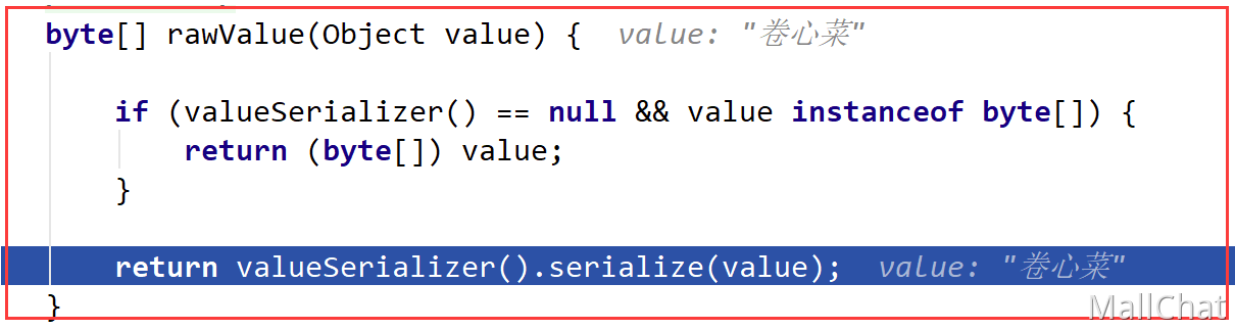
配置生效后,直接注入操作模板即可执行读写指令。需注意,原生 `RedisTemplate` 默认启用 JDK 序列化器,这会导致原始字符串被转换为二进制字节流,终端展示时呈现乱码或十六进制字符。以下为标准化测试实现:
@SpringBootTest
class CacheOperationTests {
    @Resource
    private RedisTemplate<String, Object> redisTemplate;

    @Test
    void executeBasicPutGet() {
        String cacheKey = "app:nickname";
        String targetValue = "卷心菜示例数据";
        redisTemplate.opsForValue().set(cacheKey, targetValue);
        Object fetchedValue = redisTemplate.opsForValue().get(cacheKey);
        System.out.println(fetchedValue);
    }
}
使用默认模板存储时,底层序列化策略会将 Value 转为字节数组,外部查询工具显示效果如下:

若业务仅涉及文本类型交互,建议替换为 `StringRedisTemplate`。该实例预置了字符串编解码器,可确保键值对以明文形式持久化:
MongoDB 文档数据库接入流程
对接 MongoDB 同样遵循标准化插件引入模式,通过以下依赖获取数据访问抽象层:
<dependency>
    <groupId>org.springframework.boot</groupId>
    <artifactId>spring-boot-starter-data-mongodb</artifactId>
</dependency>
集群通信地址统一由 `uri` 属性接管。无论是无认证直连还是账号鉴权模式,均采用标准 URI 语法拼装:
# 免密直连格式
spring.data.mongodb.uri=mongodb://192.168.1.100:27017/sample_db

# 凭证鉴权格式
spring.data.mongodb.uri=mongodb://readonly_user:SecurePass@192.168.1.100:27017/main_db
持久化与检索操作主要由 `MongoTemplate` 驱动。以下代码展示了实体字段映射关系以及基础的插入、全量查询逻辑:
@Document(collection = "tech_logs")
@Data
public class LogEntry {
    private String entryId;
    private String logTitle;
    private String moduleTag;
    private String description;
}

@SpringBootTest
class MongoCrudTests {
    @Autowired
    private MongoTemplate dataTemplate;

    @Test
    void persistLogEntry() {
        LogEntry item = new LogEntry();
        item.setEntryId("log_2024_09");
        item.setLogTitle("MongoDB集成记录");
        item.setModuleTag("backend");
        item.setDescription("自动化验证片段");
        dataTemplate.save(item);
    }

    @Test
    void fetchAllEntries() {
        List<LogEntry> logs = dataTemplate.findAll(LogEntry.class);
        System.out.println(logs);
    }
}