@LocalBuilder 装饰器:确保组件与状态管理的一致性
在使用 ArkUI 框架进行自定义组件开发时,开发者常通过局部构建函数实现 UI 结构的复用。当涉及到跨组件传递构建逻辑时,若采用传统的 .bind(this) 方式改变函数上下文,可能导致组件树中的父子关系与状态更新机制脱节。为解决此问题,自 API Version 12 起引入了 @LocalBuilder 装饰器。该装饰器不仅具备与局部 @Builder 相同的 UI 构建能力,还能更准确地维持组件及其状态管理之间的层级归属。
基本语法与调用方式
@LocalBuilder 用于修饰自定义组件内的成员方法,其定义格式如下:
@LocalBuilder buildContent() {
  // UI 描述
}
在组件内部调用时需显式使用 this 上下文:
this.buildContent()
- 仅可在
@Component或@ComponentV2修饰的类中声明,不可作为全局函数使用。 - 属于私有构建逻辑,只能在所属组件的
build方法或其他@LocalBuilder函数中被调用。 - 函数体内
this始终指向当前组件实例,可直接访问组件的状态变量(如@State、@Local等),推荐优先通过this访问而非参数传入。
使用限制
- 不允许在全局作用域或非组件类中声明。
- 不能与其他装饰器(包括内置和自定义)联合使用。
- 不支持修饰静态方法(
static)。
与 @Builder 的核心差异
关键区别在于函数上下文绑定行为:
- 使用
@Builder修饰的方法在传递给子组件并调用.bind(childInstance)后,其this将指向子组件,导致生成的 UI 节点隶属于子组件,从而影响状态依赖追踪路径。 - 而
@LocalBuilder无论是否执行.bind(),其所属组件始终是原始定义它的父组件,因此构建出的 UI 子树和状态更新链路始终保持一致。
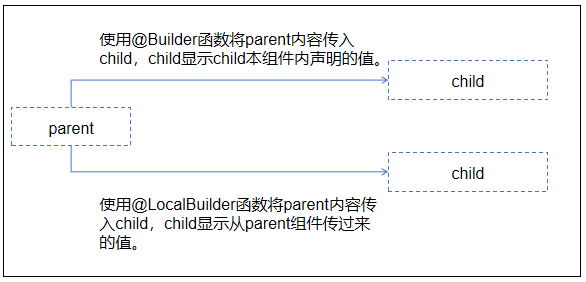
参数传递机制
@LocalBuilder 支持两种参数传递模式:按值传递和按引用传递,均需遵守以下规则:
- 传参类型必须严格匹配形参声明,禁止传入
null、undefined或返回这些值的表达式。 - 函数体内不得修改参数值。
- 参数对象字面量以引用方式传递,其余情况视为值传递。
- UI 描述部分需遵循 ArkUI 的语法规则。
引用传递示例
当传入一个对象字面量且包含状态变量时,变量变更会触发 @LocalBuilder 内部 UI 刷新:
class Model {
  text: string = '';
}

@Entry
@Component
struct ParentComponent {
  @State content: string = 'Initial';

  @LocalBuilder
  renderWithRef(data: Model) {
    Row() {
      Text(`From ref: ${data.text}`)
    }
  }

  build() {
    Column() {
      this.renderWithRef({ text: this.content })
      Button('Update').onClick(() => {
        this.content = 'Updated';
      })
    }
  }
}
点击按钮后,Text 内容将同步更新。
结合 $$ 实现深层引用传递
若需将引用参数进一步传递给子组件,可使用 $$ 语法:
@Component
struct DisplayCard {
  @Prop label: string;

  build() {
    Row() {
      Text(`Card: ${this.label}`)
    }
  }
}

@Entry
@Component
struct ParentComponent {
  @State message: string = 'Hello';

  @LocalBuilder
  buildCard($$: Model) {
    Column() {
      Text(`Host: ${$$.text}`)
      DisplayCard({ label: $$.text })
    }
  }

  build() {
    Column() {
      this.buildCard({ text: this.message })
      Button('Change Message').onClick(() => {
        this.message = 'New Message';
      })
    }
  }
}
此时,DisplayCard 中的 label 也会随父组件状态变化而刷新。
值传递的行为特征
默认情况下,参数以值形式传递。若传入的是状态变量,则其后续变化不会反映到 @LocalBuilder 内部:
@Entry
@Component
struct ValuePassExample {
  @State title: string = 'Start';

  @LocalBuilder
  displayByValue(label: string) {
    Row() {
      Text(`Static value: ${label}`)
    }
  }

  build() {
    Column() {
      this.displayByValue(this.title)
      Button('Change Title').onClick(() => {
        this.title = 'Changed';
      })
    }
  }
}
尽管 title 发生改变,但 displayByValue 接收的是快照值,UI 不会重新渲染。因此,在涉及响应式数据时应优先使用引用传递。
跨组件调用场景分析
考虑以下父子组件交互:
@Entry
@Component
struct HostComponent {
  hostLabel: string = 'Host';
  @State data: { count: number } = { count: 0 };

  @Builder
  builderRender(param: { count: number }) {
    Text(`Builder Scope: ${this.hostLabel}`)
    Text(`Count: ${param.count}`)
  }

  @LocalBuilder
  localBuilderRender(param: { count: number }) {
    Text(`LocalBuilder Scope: ${this.hostLabel}`)
    Text(`Count: ${param.count}`)
  }

  build() {
    ChildConsumer({
      renderWithBuilder: this.builderRender,
      renderWithLocal: this.localBuilderRender,
      sharedData: this.data
    })
  }
}

@Component
struct ChildConsumer {
  childLabel: string = 'Child';
  @Link sharedData: { count: number };
  @BuilderParam renderWithBuilder: (data: { count: number }) => void;
  @BuilderParam renderWithLocal: (data: { count: number }) => void;

  build() {
    Column() {
      this.renderWithBuilder({ count: this.sharedData.count })
      this.renderWithLocal({ count: this.sharedData.count })
      Button('Increase').onClick(() => {
        this.sharedData.count++;
      })
    }
  }
}
结果表现:
@Builder版本中,this.hostLabel显示为 "Child" —— 因为其this已被绑定至子组件实例。@LocalBuilder版本中,this.hostLabel仍显示为 "Host" —— 其上下文不受外部绑定影响。
在 @ComponentV2 中的应用
在新版组件模型中,@LocalBuilder 可安全访问受观察状态,并正确响应变更:
@ObservedV2
class Person {
  @Trace name: string = '';
  @Trace age: number = 0;
}

@ComponentV2
struct ProfileView {
  @Require @Param info: Person;

  build() {
    Column() {
      Text(`Name: ${this.info.name}`).fontSize(20).fontWeight(FontWeight.Bold)
      Text(`Age: ${this.info.age}`).fontSize(20).fontWeight(FontWeight.Bold)
    }
  }
}

@Entry
@ComponentV2
struct MainLayout {
  sourceA: Person = { name: 'Alice', age: 20 };
  @Local sourceB: Person = { name: 'Bob', age: 25 };

  @LocalBuilder
  renderSectionA() {
    Column() {
      Text(`Section A - ${this.sourceA.name}, ${this.sourceA.age}`)
    }
  }

  @LocalBuilder
  renderSectionB() {
    Column() {
      Text(`Section B - ${this.sourceB.name}, ${this.sourceB.age}`)
    }
  }

  build() {
    Column() {
      this.renderSectionA()
      this.renderSectionB()
      ProfileView({ info: this.sourceB })
      Button('Update Data').onClick(() => {
        this.sourceA = { name: 'Carol', age: 30 }; // 不触发刷新(无装饰器)
        this.sourceB = { name: 'David', age: 35 }; // 触发刷新(@Local)
      })
    }
  }
}
只有被状态装饰器标记的数据变更才能驱动 UI 更新,而 @LocalBuilder 能正确感知其所依赖的状态变化。
