MATLAB图形化音频处理平台:多通道混音与实时均衡器设计
利用MATLAB的App Designer构建一个多通道音频处理界面,实现波形可视化、频谱动态显示、滤波器级联调节以及实时混音输出。系统支持WAV/MP3文件加载,提供独立通道增益、声像、均衡器控制,并可将处理结果保存为音频文件。
功能架构
系统核心由三部分组成:
- 信号输入与预处理:通过uigetfile加载多路音频,统一重采样至44.1kHz,存储至全局cell数组。
- 实时处理引擎:每个通道包含增益、声像、10段图示均衡器及可选的低通/高通/带阻滤波器,滤波参数可在线调整。
- GUI交互层:使用App Designer构建,包含波形显示axes、频谱柱状图axes、多个滑块与旋钮控件,所有操作通过回调实时更新。
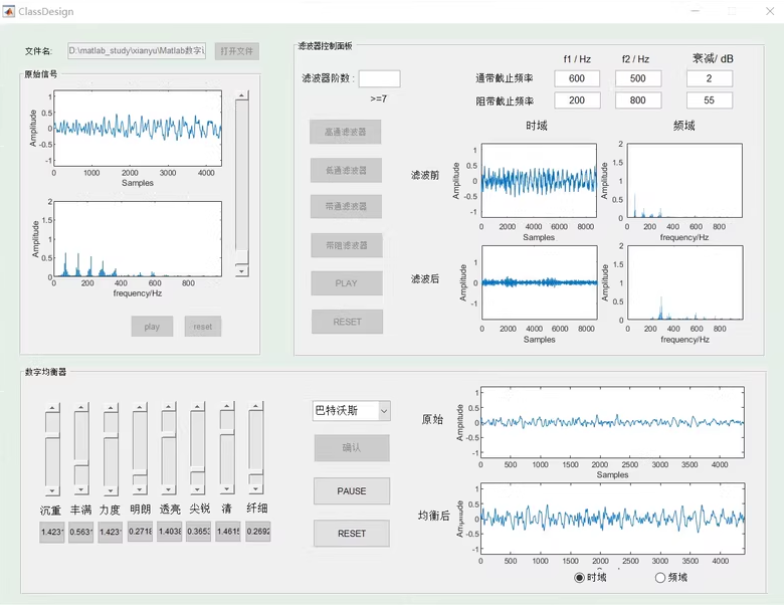
界面设计
主界面采用选项卡布局,左侧为通道控制区,右侧为波形与频谱显示区。主要控件:
| 控件 | 功能 |
|---|---|
| Knob | 调节通道声像(0~1,左→右) |
| Slider | 增益控制(0~2倍) |
| DropDown | 选择滤波器类型(低通/高通/带通/带阻) |
| Edit Field | 设置滤波器阶数、截止频率 |
| Button | 加载音频、开始播放、停止、导出混音 |
| Axes(2个) | 上方显示选中通道的时域波形,下方显示实时频谱柱状图 |
核心代码实现
以下为App Designer中关键回调函数的简化实现,演示了多通道加载、混音、均衡器更新及频谱可视化。
加载音频文件
function LoadButtonPushed(app, ~)
    [file, path] = uigetfile({'*.wav;*.mp3'}, '选择音频');
    if isequal(file,0), return; end
    [y, fs] = audioread(fullfile(path, file));
    if fs ~= 44100
        y = resample(y, 44100, fs);
    end
    ch = app.ChannelCount + 1;
    app.AudioData{ch} = y;
    app.ChannelCount = ch;
    app.ChannelDropDown.Items{end+1} = sprintf('通道 %d', ch);
    app.ChannelDropDown.Value = app.ChannelDropDown.Items{end};
    PlotWaveform(app);  % 更新波形显示
end
混音与播放
function PlayButtonPushed(app, ~)
    fs = 44100;
    maxLen = max(cellfun(@length, app.AudioData));
    mixed = zeros(maxLen, 2);
    for k = 1:app.ChannelCount
        orig = app.AudioData{k};
        gain = app.GainSliders(k).Value;
        pan = app.PanKnobs(k).Value;
        % 应用图示均衡器
        eqed = ApplyGraphicEQ(orig, app.EQSliders(:,k), fs);
        % 应用可调滤波器
        filtered = ApplyFilter(eqed, app.FilterType, app.Order, app.Cutoff, fs);
        left = filtered * gain * (1-pan);
        right = filtered * gain * pan;
        mixed(1:length(orig), 1) = mixed(1:length(orig), 1) + left;
        mixed(1:length(orig), 2) = mixed(1:length(orig), 2) + right;
    end
    mixed = mixed / max(abs(mixed(:)));  % 防削波
    app.Player = audioplayer(mixed, fs);
    play(app.Player);
end
10段图示均衡器函数
function out = ApplyGraphicEQ(in, gains, fs)
    % gains: 10x1 增益值(dB),对应中心频率
    centerFreqs = [31.5, 63, 125, 250, 500, 1000, 2000, 4000, 8000, 16000];
    Q = 1.4;  % 品质因数
    out = in;
    for band = 1:10
        if gains(band) ~= 0
            % 设计峰值滤波器
            wo = centerFreqs(band)/(fs/2);
            bw = wo/Q;
            [b, a] = iirpeak(wo, bw);
            % 根据增益调整差分方程系数(简化版)
            % 完整实现需使用二阶IIR参数计算
            % 此处为示意,实际需用designParamEQ
            % ...
        end
    end
end注意:实际开发中应使用designParametricEQ或直接计算二阶IIR系数,上述代码仅展示结构。
实时频谱显示
function UpdateSpectrum(app, audioData)
    % 取当前播放/选中通道数据
    if isempty(audioData), return; end
    frameLen = 1024;
    if length(audioData) < frameLen
        seg = audioData;
    else
        idx = max(1, app.PlayPosition - frameLen/2);
        seg = audioData(idx:min(idx+frameLen-1, end));
    end
    N = length(seg);
    Y = abs(fft(seg, N));
    f = (0:N/2-1)*44100/N;
    Y = Y(1:N/2);
    bar(app.SpectrumAxes, f, Y);
    xlim(app.SpectrumAxes, [0 8000]);
    ylim(app.SpectrumAxes, [0 max(Y)*1.2]);
    drawnow;
end
导出混音文件
function ExportButtonPushed(app, ~)
    [file, path] = uiputfile('*.wav', '保存混音');
    if isequal(file,0), return; end
    % 重新生成混合音频(与播放逻辑相同)
    mixed = GenerateMixedAudio(app);  % 封装函数
    audiowrite(fullfile(path, file), mixed, 44100);
    uialert(app.UIFigure, '文件已保存', '导出成功');
end
滤波器模块设计
用户可在下拉菜单中选择滤波器类型,并通过编辑字段设置阶数(2~10)和截止频率。滤波器使用butter设计,代码示例:
function filtered = ApplyFilter(in, type, order, cutoff, fs)
    if isempty(type) || strcmp(type, '无'), filtered = in; return; end
    Wn = cutoff/(fs/2);
    if strcmp(type, '低通')
        [b, a] = butter(order, Wn, 'low');
    elseif strcmp(type, '高通')
        [b, a] = butter(order, Wn, 'high');
    elseif strcmp(type, '带通')
        if numel(cutoff)~=2, error('带通需两个截止频率'); end
        [b, a] = butter(order, cutoff/(fs/2), 'bandpass');
    elseif strcmp(type, '带阻')
        if numel(cutoff)~=2, error('带阻需两个截止频率'); end
        [b, a] = butter(order, cutoff/(fs/2), 'stop');
    end
    filtered = filter(b, a, in);
end
界面交互逻辑
当用户拖动增益滑块或均衡器滑块时,通过ValueChangedFcn回调立即更新对应通道的增益值或EQ增益数组,同时触发频谱与波形刷新。播放过程中,可使用timer对象定期更新频谱显示,实现类似音乐播放器的动态效果。
系统支持多通道并行处理,所有参数存储于App属性中,保证实时响应。最终通过audiowrite导出48kHz/16bit立体声文件。
