DeepSeek-V3与Semantic Kernel集成模型上下文协议(MCP)实战
模型上下文协议(MCP)概述
在深入实践之前,我们首先了解模型上下文协议(Model Context Protocol, MCP)的基本概念、其重要性以及与传统Function Calling机制的区别。
MCP是什么?
模型上下文协议(MCP)是一个开放标准,旨在实现大型语言模型(LLM)应用与外部数据源及工具之间的无缝交互。无论是开发AI驱动的集成开发环境(IDE)、优化聊天机器人体验,还是构建定制化的AI工作流,MCP都提供了一种标准化的方法,将LLM与所需的上下文信息连接起来。
MCP生态系统中的关键组成部分包括:
- MCP Hosts(宿主): 旨在通过MCP访问数据的应用程序,例如桌面AI助手、IDE插件或各种AI工具。
- MCP Clients(客户端): 与MCP服务器建立一对一连接的协议客户端。
- MCP Servers(服务器): 轻量级程序,每个程序通过标准化的模型上下文协议公开特定的功能或数据访问接口。
- Local Data Sources(本地数据源): MCP服务器能够安全访问的本地计算机文件、数据库或服务。
- Remote Services(远程服务): MCP服务器可以通过API等方式连接的互联网上的外部系统。
MCP的核心优势
采用MCP能够为AI应用带来多方面益处:
- 增强LLM能力:使模型能够获取实时数据、企业专属信息和本地计算资源。
- 数据隐私与安全:数据可以保留在本地或受控环境中,从而降低敏感信息泄露的风险。
- 高效工具集成:让LLM能够调用并控制外部工具,极大地扩展其功能边界。
- 减少"幻觉"现象:通过提供精确、实时的上下文信息,有效降低模型生成不准确或虚假内容的可能性。
- 标准化接口:为开发者提供统一的接口,简化不同系统间的集成流程。
- 卓越可扩展性:支持从简单任务到复杂企业级应用等多种场景。
- 跨语言兼容性:标准化的MCP协议使得不同编程语言实现的MCP Server能力可以互操作。
MCP与Function Calling的对比分析
MCP和Function Calling经常被提及,它们之间存在何种关系与区别?
| 特性 | 模型上下文协议 (MCP) | Function Calling |
|---|---|---|
| 基础关系 | 基于Function Calling构建并进行了功能扩展 | 作为MCP技术栈的基础组成部分 |
| 设计范围 | 更为宽泛的协议,涵盖上下文获取和外部工具使用 | 主要侧重于模型对特定函数调用的决策与执行 |
| 架构模型 | 采用客户端-服务器架构,支持分布式系统集成 | 通常是API参数的直接定义与调用方式 |
| 数据处理 | 能够处理大规模数据集和复杂的上下文信息 | 主要处理结构化的函数输入参数和返回值 |
| 上下文管理 | 专门设计用于管理和向LLM提供丰富的上下文 | 上下文管理并非其核心功能,通常依赖外部机制 |
| 标准化程度 | 开放协议,旨在实现跨系统和模型的高度标准化 | 实现方式因平台而异,标准化程度相对较低 |
| 典型应用 | 适用于需要复杂上下文与多工具协作的场景 | 适用于调用预定义函数以执行特定任务的场景 |
简而言之,MCP是在Function Calling之上演进的更为全面的协议,它不仅保留了Function Calling的核心能力,还增强了上下文的获取与管理机制,为LLM提供了一个更丰富、更标准化的外部环境交互能力。
构建MCP客户端应用
本节将指导您创建一个MCP客户端应用程序。请确保您已有一个正在运行的MCP服务器提供所需工具,因为客户端需要这些工具进行交互。本教程假定您已完成了MCP服务器的设置。
此外,您需要获取一个LLM的API密钥。本示例将使用DeepSeek-V3模型。您可以从相关平台(例如Coreshub)获取API密钥。
1. 创建MCP客户端项目
首先,创建一个新的.NET控制台应用程序项目:
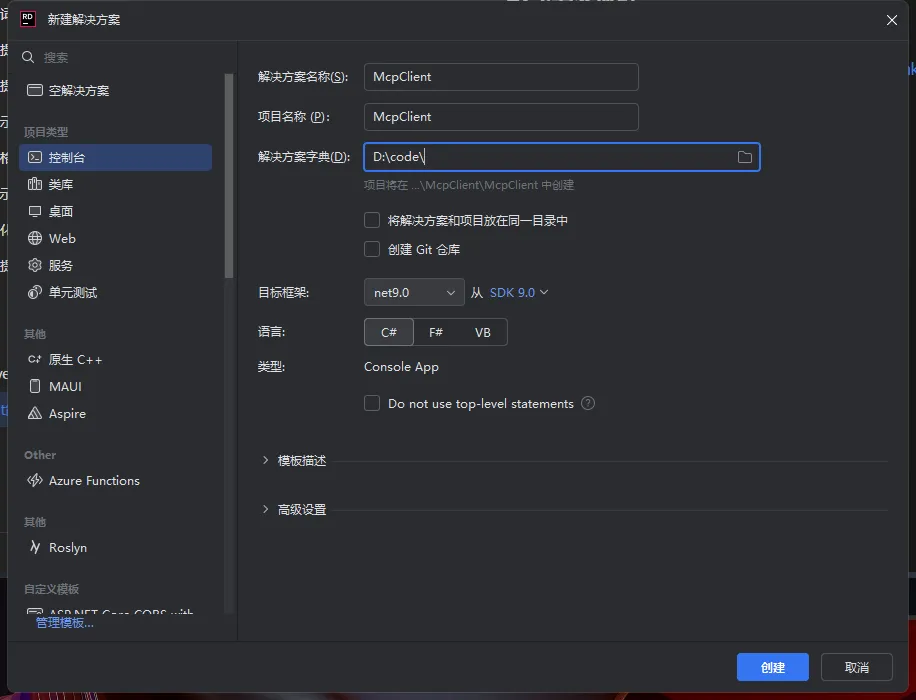
接着,为项目添加以下必要的NuGet包引用:
<ItemGroup>
    <PackageReference Include="Microsoft.Extensions.Hosting" Version="9.0.3" />
    <PackageReference Include="Microsoft.SemanticKernel" Version="1.44.0" />
    <PackageReference Include="ModelContextProtocol" Version="0.1.0-preview.4" />
</ItemGroup>
本教程将基于Microsoft.SemanticKernel进行开发,并依赖于官方的ModelContextProtocol包以及Microsoft.Extensions.Hosting。
2. 扩展Semantic Kernel以支持MCP
由于Semantic Kernel默认不直接支持MCP功能,我们需要进行扩展。创建以下辅助类:
ToolParameterSchema.cs
using System.Text.Json.Serialization;
using System.Collections.Generic;

/// <summary>
/// 代表工具输入参数的JSON Schema。
/// 详情请参考:https://github.com/modelcontextprotocol/specification/blob/main/schema/2024-11-05/schema.json
/// </summary>
internal class ToolParameterSchema
{
    /// <summary>
    /// Schema的类型,应为"object"。
    /// </summary>
    [JsonPropertyName("type")]
    public string SchemaType { get; set; } = "object";

    /// <summary>
    /// 属性名称到属性定义的映射。
    /// </summary>
    [JsonPropertyName("properties")]
    public Dictionary<string, SchemaPropertyDefinition>? PropertyDefinitions { get; set; }

    /// <summary>
    /// 必需属性名称的列表。
    /// </summary>
    [JsonPropertyName("required")]
    public List<string>? MandatoryFields { get; set; }
}
SchemaPropertyDefinition.cs
using System.Text.Json.Serialization;

/// <summary>
/// 代表JSON Schema中的一个属性定义。
/// 详情请参考:https://github.com/modelcontextprotocol/specification/blob/main/schema/2024-11-05/schema.json
/// </summary>
internal class SchemaPropertyDefinition
{
    /// <summary>
    /// 属性的数据类型。应为JSON Schema类型,且为必需项。
    /// </summary>
    [JsonPropertyName("type")]
    public string DataType { get; set; } = string.Empty;

    /// <summary>
    /// 属性的人类可读描述。
    /// </summary>
    [JsonPropertyName("description")]
    public string? FieldDescription { get; set; } = string.Empty;
}
接下来,创建MCP扩展类,用于将MCP提供的工具转换为Semantic Kernel可用的函数:
McpSemanticKernelIntegration.cs
using System;
using System.Collections.Generic;
using System.Linq;
using System.Text.Json;
using System.Threading;
using System.Threading.Tasks;
using McpClient;
using Microsoft.SemanticKernel;
using Microsoft.SemanticKernel.Arguments;
using Microsoft.SemanticKernel.Metadata;

/// <summary>
/// 提供ModelContextProtocol与Semantic Kernel的扩展方法。
/// </summary&
internal static class McpSemanticKernelIntegration
{
    /// <summary>
    /// 将IMcpClient上公开的工具映射为KernelFunction实例集合,供Semantic Kernel使用。
    /// </summary>
    /// <param name="mcpClient">IMcpClient实例。</param>
    /// <param name="cancellationToken">可选的CancellationToken。</param>
    /// <returns>包含KernelFunction实例的只读列表。</returns>
    internal static async Task<IReadOnlyList<KernelFunction>> IntegrateMcpToolsAsKernelFunctionsAsync(
        this IMcpClient mcpClient,
        CancellationToken cancellationToken = default)
    {
        var skFunctions = new List<KernelFunction>();
        foreach (var mcpTool in await mcpClient.ListToolsAsync(cancellationToken).ConfigureAwait(false))
        {
            skFunctions.Add(mcpTool.ConvertMcpToolToKernelFunction(mcpClient, cancellationToken));
        }
        return skFunctions;
    }

    /// <summary>
    /// 将单个McpClientTool转换为Semantic Kernel的KernelFunction。
    /// </summary>
    private static KernelFunction ConvertMcpToolToKernelFunction(
        this McpClientTool mcpTool,
        IMcpClient mcpClient,
        CancellationToken cancellationToken)
    {
        async Task<string> ExecuteMcpToolInvocation(
            Kernel kernel,
            KernelFunction function,
            KernelArguments arguments,
            CancellationToken ct)
        {
            try
            {
                // 将Semantic Kernel参数转换为MCP期望的字典格式
                var mcpCallArgs = new Dictionary<string, object?>();
                foreach (var argEntry in arguments)
                {
                    if (argEntry.Value is not null)
                    {
                        mcpCallArgs[argEntry.Key] = function.AdjustArgumentValueForMcpCall(argEntry.Key, argEntry.Value);
                    }
                }

                // 通过ModelContextProtocol调用工具
                var invocationResult = await mcpClient.CallToolAsync(
                    mcpTool.Name,
                    mcpCallArgs.AsReadOnly(),
                    cancellationToken: ct
                ).ConfigureAwait(false);

                // 从结果中提取文本内容
                return string.Join("\n", invocationResult.Content
                    .Where(contentPart => contentPart.Type == "text")
                    .Select(contentPart => contentPart.Text));
            }
            catch (Exception ex)
            {
                await Console.Error.WriteLineAsync($"调用工具 '{mcpTool.Name}' 时发生错误: {ex.Message}");
                // 重新抛出异常,以便Semantic Kernel处理
                throw;
            }
        }

        return KernelFunctionFactory.CreateFromMethod(
            method: ExecuteMcpToolInvocation,
            functionName: mcpTool.Name,
            description: mcpTool.Description,
            parameters: mcpTool.GenerateKernelParameterMetadata(),
            returnParameter: CreateKernelReturnParameter()
        );
    }

    /// <summary>
    /// 根据Semantic Kernel参数类型调整MCP参数值。
    /// </summary>
    private static object AdjustArgumentValueForMcpCall(this KernelFunction function, string paramName, object value)
    {
        var targetParamType = function.Metadata.Parameters.FirstOrDefault(p => p.Name == paramName)?.ParameterType;

        if (targetParamType == null)
        {
            return value;
        }

        Type? underlyingType = Nullable.GetUnderlyingType(targetParamType);

        if (underlyingType == typeof(int)) return Convert.ToInt32(value);
        if (underlyingType == typeof(double)) return Convert.ToDouble(value);
        if (underlyingType == typeof(bool)) return Convert.ToBoolean(value);

        if (targetParamType == typeof(List<string>)) return (value as IEnumerable<object>)?.OfType<string>().ToList() ?? value;
        if (targetParamType == typeof(Dictionary<string, object>)) return (value as Dictionary<string, object>)?.ToDictionary(kvp => kvp.Key, kvp => kvp.Value) ?? value;

        return value;
    }

    /// <summary>
    /// 根据MCP工具的JSON Schema生成KernelParameterMetadata列表。
    /// </summary>
    private static List<KernelParameterMetadata>? GenerateKernelParameterMetadata(this McpClientTool mcpTool)
    {
        var inputSchema = JsonSerializer.Deserialize<ToolParameterSchema>(mcpTool.JsonSchema.GetRawText());
        var properties = inputSchema?.PropertyDefinitions;
        if (properties == null)
        {
            return null;
        }

        HashSet<string> requiredFields = new HashSet<string>(inputSchema!.MandatoryFields ?? []);
        return properties.Select(propEntry =>
            new KernelParameterMetadata(propEntry.Key)
            {
                Description = propEntry.Value.FieldDescription,
                ParameterType = MapJsonSchemaTypeToClrType(propEntry.Value, requiredFields.Contains(propEntry.Key)),
                IsRequired = requiredFields.Contains(propEntry.Key)
            }).ToList();
    }

    /// <summary>
    /// 创建Semantic Kernel函数的返回参数元数据。
    /// </summary>
    private static KernelReturnParameterMetadata CreateKernelReturnParameter()
    {
        return new KernelReturnParameterMetadata
        {
            ParameterType = typeof(string),
        };
    }

    /// <summary>
    /// 将JSON Schema数据类型映射到.NET公共语言运行时(CLR)类型。
    /// </summary>
    private static Type MapJsonSchemaTypeToClrType(SchemaPropertyDefinition propDef, bool isRequired)
    {
        var clrType = propDef.DataType switch
        {
            "string" => typeof(string),
            "integer" => typeof(int),
            "number" => typeof(double),
            "boolean" => typeof(bool),
            "array" => typeof(List<string>),
            "object" => typeof(Dictionary<string, object>),
            _ => typeof(object)
        };

        // 如果属性不是必需的且是值类型,则返回其对应的Nullable类型
        return !isRequired && clrType.IsValueType ? typeof(Nullable<>).MakeGenericType(clrType) : clrType;
    }
}
然后,创建Semantic Kernel的扩展,以方便集成MCP功能:
SemanticKernelMcpExtensions.cs
using System.Collections.Concurrent;
using System.Collections.Generic;
using System.Text.RegularExpressions;
using System.Threading;
using System.Threading.Tasks;
using McpClient;
using Microsoft.Extensions.Logging;
using Microsoft.Extensions.Logging.Abstractions;
using Microsoft.SemanticKernel;
using Microsoft.SemanticKernel.Plugins;

/// <summary>
/// 为KernelPlugin提供扩展方法,用于集成MCP功能。
/// </summary>
public static class SemanticKernelMcpExtensions
{
    private static readonly ConcurrentDictionary<string, IKernelBuilderPlugins> _pluginCacheMap = new();

    /// <summary>
    /// 从包含指定MCP函数的SSE服务器创建Model Context Protocol插件,并将其添加到插件集合中。
    /// </summary>
    /// <param name="plugins">IKernelBuilderPlugins实例。</param>
    /// <param name="sseEndpoint">MCP SSE服务器的端点URL。</param>
    /// <param name="serverIdentifier">服务器的名称或标识符。</param>
    /// <param name="cancellationToken">可选的CancellationToken。</param>
    /// <returns>包含已集成MCP函数的KernelPlugin。</returns>
    public static async Task<IKernelBuilderPlugins> AddMcpToolsAsPluginsAsync(
        this IKernelBuilderPlugins plugins,
        string sseEndpoint,
        string serverIdentifier,
        CancellationToken cancellationToken = default)
    {
        var safePluginName = SanitizePluginIdentifier(serverIdentifier);

        if (_pluginCacheMap.TryGetValue(safePluginName, out var cachedPlugin))
        {
            return cachedPlugin;
        }

        var mcpClient = await CreateMcpClientInstanceAsync(serverIdentifier, sseEndpoint, null, null, cancellationToken).ConfigureAwait(false);
        var kernelFunctions = await mcpClient.IntegrateMcpToolsAsKernelFunctionsAsync(cancellationToken: cancellationToken).ConfigureAwait(false);

        // 当操作取消时,确保客户端被正确处置
        cancellationToken.Register(() => mcpClient.DisposeAsync().ConfigureAwait(false).GetAwaiter().GetResult());

        var newKernelPlugin = plugins.AddFromFunctions(safePluginName, kernelFunctions);
        return _pluginCacheMap[safePluginName] = newKernelPlugin;
    }

    /// <summary>
    /// 创建并返回一个IMcpClient实例。
    /// </summary>
    private static async Task<IMcpClient> CreateMcpClientInstanceAsync(
        string serverName,
        string? endpoint,
        Dictionary<string, string>? transportConfiguration,
        ILoggerFactory? loggerFactory,
        CancellationToken cancellationToken)
    {
        var activeTransportType = !string.IsNullOrEmpty(endpoint) ? TransportTypes.Sse : TransportTypes.StdIo;

        McpClientOptions clientOptions = new()
        {
            ClientInfo = new()
            {
                Name = $"{serverName} {activeTransportType}Client",
                Version = "1.0.0"
            }
        };

        var serverConfig = new McpServerConfig
        {
            Id = serverName.ToLowerInvariant(),
            Name = serverName,
            Location = endpoint,
            TransportType = activeTransportType,
            TransportOptions = transportConfiguration
        };

        return await McpClientFactory.CreateAsync(serverConfig, clientOptions,
            loggerFactory: loggerFactory ?? NullLoggerFactory.Instance, cancellationToken: cancellationToken);
    }

    /// <summary>
    /// 将服务器名称转换为安全的插件名称(只包含ASCII字母、数字和下划线)。
    /// </summary>
    private static string SanitizePluginIdentifier(string rawName)
    {
        return Regex.Replace(rawName, @"[^\w]", "_");
    }
}
3. 实现与MCP服务器工具的连接
现在,我们可以编写核心代码来连接和使用MCP服务器提供的工具。打开您的Program.cs文件,并添加以下逻辑:
using McpClient;
using Microsoft.SemanticKernel;
using Microsoft.SemanticKernel.ChatCompletion;
using Microsoft.SemanticKernel.Connectors.OpenAI;
using Microsoft.Extensions.Hosting;
using Microsoft.Extensions.Configuration;
using McpClient.Model; // 确保引用了McpClient.Model以使用TransportTypes
using SemanticKernelMcpExtensions; // 引用您的扩展类
using ChatMessageContent = Microsoft.SemanticKernel.ChatMessageContent;
using System;
using System.Threading.Tasks;
using System.Linq;

#pragma warning disable SKEXP0010 // 禁用实验性API警告

var hostBuilder = Host.CreateEmptyApplicationBuilder(settings: null);

hostBuilder.Configuration
    .AddEnvironmentVariables()
    .AddUserSecrets<Program>();

// 配置DeepSeek-V3聊天模型
var skBuilder = hostBuilder.Services.AddKernel()
    .AddOpenAIChatCompletion(
        modelId: "DeepSeek-V3",
        endpoint: new Uri("https://openapi.coreshub.cn/v1"),
        apiKey: "您的DeepSeek-V3 API密钥" // 请替换为您的实际API密钥
    );

// 从MCP SSE服务器添加工具作为Semantic Kernel插件
await skBuilder.Plugins.AddMcpToolsAsPluginsAsync("http://<您的MCP服务器IP>:<端口>/sse", "MyMcpServer"); // 替换为您的MCP服务器地址和名称

Console.ForegroundColor = ConsoleColor.Green;
Console.WriteLine("MCP 客户端已启动,准备接收指令!");
Console.ResetColor();

var app = hostBuilder.Build();

var skCore = app.Services.GetService<Kernel>();
var chatService = app.Services.GetService<IChatCompletionService>();

DisplayInputPrompt();
while (Console.ReadLine() is string userInput && !"exit".Equals(userInput, StringComparison.OrdinalIgnoreCase))
{
    if (string.IsNullOrWhiteSpace(userInput))
    {
        DisplayInputPrompt();
        continue;
    }

    // 设置聊天历史,包含系统指令以指导模型使用工具
    var conversationHistory = new ChatHistory
    {
        new ChatMessageContent(AuthorRole.System, "当用户需要计算任意两个数字的和时,务必调用可用的工具来完成。"),
        new ChatMessageContent(AuthorRole.User, userInput)
    };

    // 使用工具调用行为,让Semantic Kernel自动调用工具
    await foreach (var messageChunk in chatService?.GetStreamingChatMessageContentsAsync(
        conversationHistory,
        new OpenAIPromptExecutionSettings()
        {
            ToolCallBehavior = ToolCallBehavior.AutoInvokeKernelFunctions,
        }, skCore))
    {
        Console.Write(messageChunk.Content);
    }

    Console.WriteLine();
    DisplayInputPrompt();
}

static void DisplayInputPrompt()
{
    Console.WriteLine("请输入指令(输入 'exit' 退出):");
    Console.ForegroundColor = ConsoleColor.Cyan;
    Console.Write("> ");
    Console.ResetColor();
}
在启动MCP客户端之前,请务必修改Program.cs中的API密钥和MCP服务器地址(http://<您的MCP服务器IP>:<端口>/sse)。请确保您的MCP服务器已先行启动。
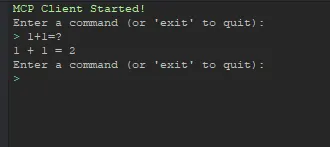
运行MCP客户端后,您可以尝试输入类似"1加1等于多少?"这样的问题。您将看到类似以下的结果:
在执行过程中,您可以在MCP服务器端的算法函数中设置断点,清晰地观察到函数被调用的流程:
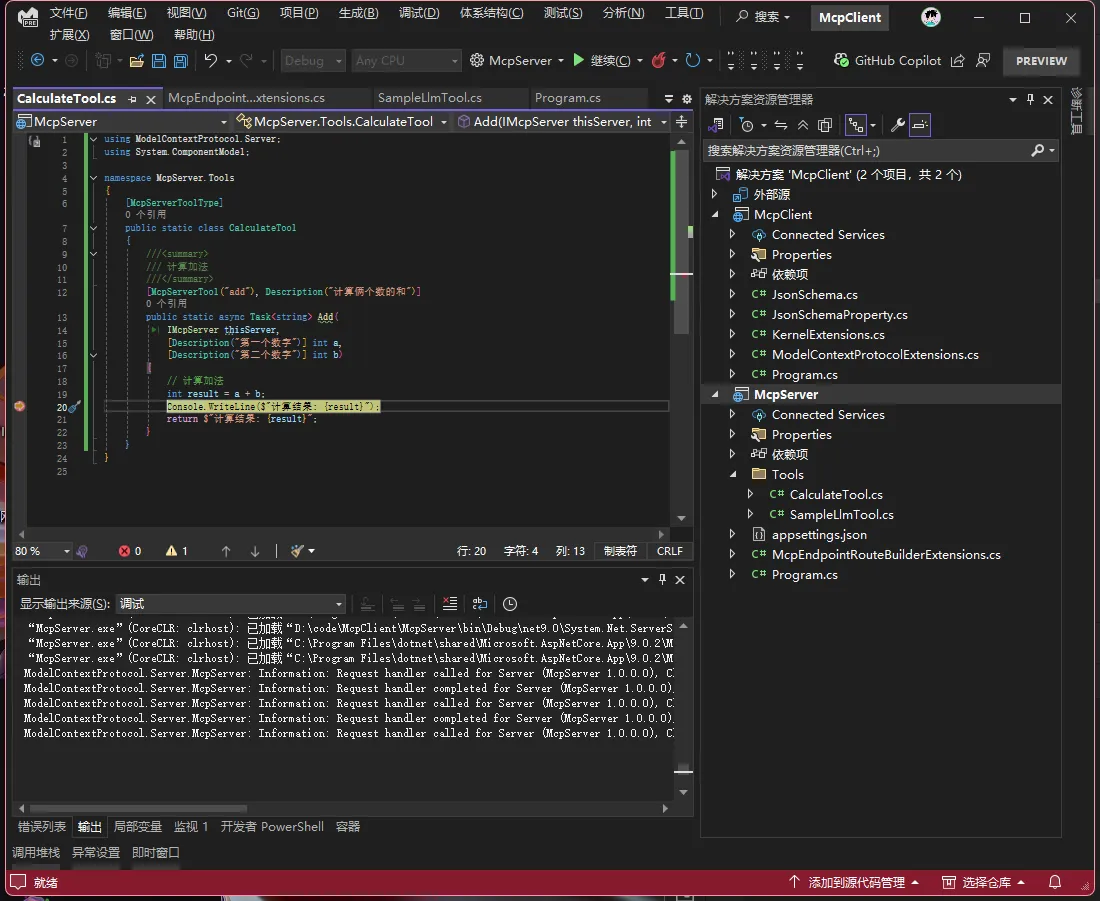
通过以上步骤,您已经成功掌握了MCP服务器、MCP客户端和Semantic Kernel的基础集成教程。
