VMware虚拟机与Docker代理设置指南
获取宿主机代理信息
首先确认本地网络接口的IPv4地址。以Windows系统为例,通过命令行执行ipconfig查看无线网卡配置:
C:\Users\user> ipconfig

无线局域网适配器 WLAN:
   IPv4 地址 . . . . . . . . . . . . : 192.135.0.161
   子网掩码  . . . . . . . . . . . . : 255.255.255.0
   默认网关. . . . . . . . . . . . . : 192.135.0.1
假设代理服务监听端口为 11823,则代理服务器地址为 http://192.135.0.161:11823。
VMware 网络模式配置
在 VMware 中选中目标虚拟机,右键进入"设置" → "网络适配器",选择NAT模式,确保虚拟机可通过宿主机共享网络连接。
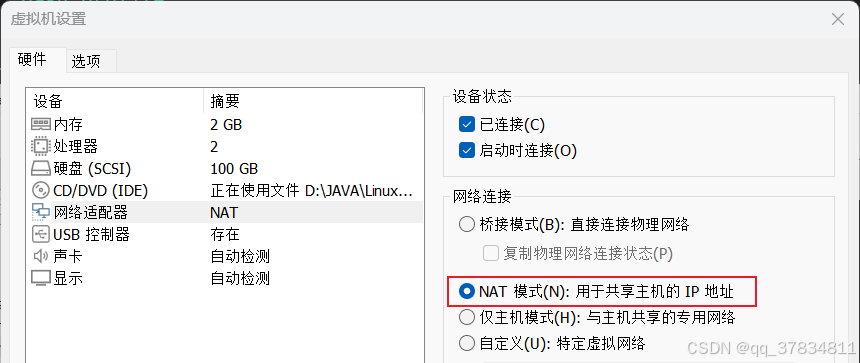
Linux 系统级代理配置
登录虚拟机中的Linux系统,进行以下环境变量设置。
1. 设置Shell代理变量
编辑用户根目录下的环境配置文件:
sudo vi ~/.bash_profile
添加如下内容:
export http_proxy="http://192.135.0.161:11823"
export https_proxy="http://192.135.0.161:11823"
export ftp_proxy="http://192.135.0.161:11823"
export no_proxy="localhost,127.0.0.1"
export WGETRC="$HOME/.wgetrc"
2. 配置 wget 使用代理
创建或修改 wget 的专属配置文件:
vi ~/.wgetrc
写入:
use_proxy = on
http_proxy = http://192.135.0.161:11823
https_proxy = http://192.135.0.161:11823
3. 加载并验证配置
应用更改:
source ~/.bash_profile
检查环境变量是否生效:
echo $http_proxy
# 输出:http://192.135.0.161:11823
测试网页下载功能:
wget -O index.html https://hub.docker.com/
--2024-12-01 13:36:16--  https://hub.docker.com/
Connecting to 192.135.0.161:11823... connected.
Proxy request sent, awaiting response... 200 OK
Saving to: ‘index.html’
Docker 代理配置方法
Docker 守护进程需要单独配置代理才能访问外部镜像仓库。
1. 创建 systemd 代理配置文件
新建目录和配置文件:
sudo mkdir -p /etc/systemd/system/docker.service.d
sudo vi /etc/systemd/system/docker.service.d/http-proxy.conf
填入以下内容:
[Service]
Environment="HTTP_PROXY=http://192.135.0.161:11823"
Environment="HTTPS_PROXY=http://192.135.0.161:11823"
Environment="NO_PROXY=localhost,127.0.0.1"
2. 重载守护进程并重启 Docker
sudo systemctl daemon-reload
sudo systemctl restart docker
3. 检查服务状态
sudo systemctl status docker
4. 验证代理设置结果
docker info | grep -i proxy
# 应输出:
#  HTTP Proxy: http://192.135.0.161:11823
#  HTTPS Proxy: http://192.135.0.161:11823
#  No Proxy: localhost,127.0.0.1
5. 配置镜像加速源
编辑 Docker 守护进程配置文件:
sudo vi /etc/docker/daemon.json
加入国内镜像站和不安全注册表(可选):
{
  "registry-mirrors": ["https://docker.mirrors.ustc.edu.cn"],
  "insecure-registries": ["192.168.0.134:80"]
}
6. 查看镜像源配置效果
docker info | grep -A 3 "Registry Mirrors:"
# Registry Mirrors:
#  https://docker.mirrors.ustc.edu.cn/
7. 清理旧镜像并拉取新镜像
删除已存在的 Nginx 镜像:
docker images | grep nginx | awk 'NR>1 {print $3}' | xargs docker rmi -f || true
从公共仓库拉取镜像:
docker pull nginx:latest
Using default tag: latest
latest: Pulling from library/nginx
Digest: sha256:0c86dddac19f2ce4fd716ac58c0fd87bf69bfd4edabfd6971fb885bafd12a00b
Status: Downloaded newer image for nginx:latest
