环境准备
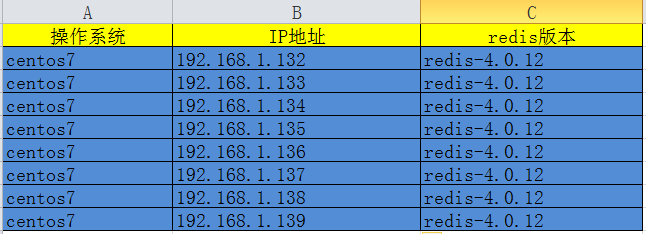
1. 禁用防火墙或配置放行规则
2. 禁用安全模块
3. 安装Redis实例,参考:https://www.cnblogs.com/panwenbin-logs/p/10242027.html
集群配置
- 修改节点配置文件(六节点同步操作)
[root@redis-master ~]# grep "^[a-Z]" /etc/redis/redis_6379.conf
bind 0.0.0.0
protected-mode yes
port 6379
tcp-backlog 511
timeout 0
tcp-keepalive 300
daemonize yes
supervised no
pidfile /var/run/redis_6379.pid
loglevel notice
logfile /var/log/redis/redis_6379.log
databases 16
always-show-logo yes
save 900 1
save 300 10
save 60 10000
stop-writes-on-bgsave-error yes
rdbcompression yes
rdbchecksum yes
dbfilename dump.rdb
dir /var/redis
slave-serve-stale-data yes
slave-read-only yes
repl-diskless-sync no
repl-diskless-sync-delay 5
repl-disable-tcp-nodelay no
slave-priority 100
lazyfree-lazy-eviction no
lazyfree-lazy-expire no
lazyfree-lazy-server-del no
slave-lazy-flush no
appendonly yes
appendfilename "appendonly.aof"
appendfsync everysec
no-appendfsync-on-rewrite no
auto-aof-rewrite-percentage 100
auto-aof-rewrite-min-size 64mb
aof-load-truncated yes
aof-use-rdb-preamble no
lua-time-limit 5000
cluster_mode enabled    #启用集群模式
cluster_config /etc/redis-cluster/node-6379.conf  #集群配置路径
cluster_timeout 15000 #节点超时时间
slowlog-log-slower-than 10000
slowlog-max-len 128
latency-monitor-threshold 0
notify-keyspace-events ""
hash-max-ziplist-entries 512
hash-max-ziplist-value 64
list-max-ziplist-size -2
list-compress-depth 0
set-max-intset-entries 512
zset-max-ziplist-entries 128
zset-max-ziplist-value 64
hll-sparse-max-bytes 3000
activerehashing yes
client-output-buffer-limit normal 0 0 0
client-output-buffer-limit slave 256mb 64mb 60
client-output-buffer-limit pubsub 32mb 8mb 60
hz 10
aof-rewrite-incremental-fsync yes<br></br><br></br>[root@redis-master ~]# mkdir -p /etc/redis-cluster
[root@redis-master ~]# mkdir -p /var/log/redis
2、安装依赖环境(参考:https://www.cnblogs.com/ding2016/p/7903147.html)
<strong>#仅需在单节点操作</strong><br></br>[root@redis-master ~]#gpg --keyserver hkp://keys.gnupg.net --recv-keys 409B6B1796C275462A1703113804BB82D39DC0E3 7D2BAF1CF37B13E2069D6956105BD0E739499BDB
[root@redis-master ~]#curl -sSL https://get.rvm.io | bash -s stable
[root@redis-master ~]#source  /etc/profile.d/rvm.sh
[root@redis-master ~]#rvm install 2.2.10
[root@redis-master ~]#gem install redis
3、集群初始化(使用六个节点创建)
[root@redis-master ~]#cd /usr/local/redis-4.0.12/src/
[root@redis-master ~]# systemctl start redis #启动服务,清空数据
127.0.0.1:6379>  flushall
OK
127.0.0.1:6379> cluster reset
OK
127.0.0.1:6379> exit
[root@redis-master ~]#./redis_cluster_tool create --replicas 1 192.168.1.132:6379 192.168.1.133:6379 192.168.1.134:6379 192.168.1.135:6379 192.168.1.136:6379 192.168.1.137:6379 #创建集群
>>> Creating cluster
>>> Performing hash slots allocation on 6 nodes...
Using 3 masters:
192.168.1.132:6379
192.168.1.133:6379
192.168.1.134:6379
Adding replica 192.168.1.136:6379 to 192.168.1.132:6379
Adding replica 192.168.1.137:6379 to 192.168.1.133:6379
Adding replica 192.168.1.135:6379 to 192.168.1.134:6379
M: a0fcce870bed5b4d8bc81467e39d55e5ff4be7e8 192.168.1.132:6379
   slots:0-5460 (5461 slots) master
M: 7e07bd4d8656672b0da7add910bfdba49106def3 192.168.1.133:6379
   slots:5461-10922 (5462 slots) master
M: 0b5efedf68451a48fa40270ff67e84c03faee56e 192.168.1.134:6379
   slots:10923-16383 (5461 slots) master
S: 5b82091b9078ebfb265eedd1b65bf7222a143cd7 192.168.1.135:6379
   replicates 0b5efedf68451a48fa40270ff67e84c03faee56e
S: e19150bf1bbc621dde7bd94d9efde3170f211591 192.168.1.136:6379
   replicates a0fcce870bed5b4d8bc81467e39d55e5ff4be7e8
S: 7e9e756bcebe8225089dc8652a60c26522b653ff 192.168.1.137:6379
   replicates 7e07bd4d8656672b0da7add910bfdba49106def3
Can I set the above configuration? (type 'yes' to accept): yes
>>> Nodes configuration updated
>>> Assign a different config epoch to each node
>>> Sending CLUSTER MEET messages to join the cluster
Waiting for the cluster to join...
>>> Performing Cluster Check (using node 192.168.1.132:6379)
M: a0fcce870bed5b4d8bc81467e39d55e5ff4be7e8 192.168.1.132:6379
   slots:0-5460 (5461 slots) master
   1 additional replica(s)
S: 7e9e756bcebe8225089dc8652a60c26522b653ff 192.168.1.137:6379
   slots: (0 slots) slave
   replicates 7e07bd4d8656672b0da7add910bfdba49106def3
M: 7e07bd4d8656672b0da7add910bfdba49106def3 192.168.1.133:6379
   slots:5461-10922 (5462 slots) master
   1 additional replica(s)
M: 0b5efedf68451a48fa40270ff67e84c03faee56e 192.168.1.134:6379
   slots:10923-16383 (5461 slots) master
   1 additional replica(s)
S: 5b82091b9078ebfb265eedd1b65bf7222a143cd7 192.168.1.135:6379
   slots: (0 slots) slave
   replicates 0b5efedf68451a48fa40270ff67e84c03faee56e
S: e19150bf1bbc621dde7bd94d9efde3170f211591 192.168.1.136:6379
   slots: (0 slots) slave
   replicates a0fcce870bed5b4d8bc81467e39d55e5ff4be7e8
[OK] All nodes agree about slots configuration.
>>> Check for open slots...
>>> Check slots coverage...
[OK] All 16384 slots covered.
集群功能验证
1、多节点写入测试
[root@redis-master ~]# redis-cli -h 192.168.1.132 -p 6379
192.168.1.132:6379> set k1 v1
(error) MOVED 12706 192.168.1.134:6379
192.168.1.132:6379> set k2 v2
OK
192.168.1.132:6379> set k3 v3
OK
192.168.1.132:6379> set k4 v4
(error) MOVED 8455 192.168.1.133:6379
192.168.1.132:6379> exit
[root@redis-master ~]# redis-cli -h 192.168.1.133 -p 6379
192.168.1.133:6379> set k1 v1
(error) MOVED 12706 192.168.1.134:6379
192.168.1.133:6379> set k4 v4
OK
192.168.1.133:6379> get k2
(error) MOVED 449 192.168.1.132:6379
192.168.1.132:6379> exit
2、跨节点读取验证
[root@redis-master ~]# redis-cli -h 192.168.1.132 -p 6379
192.168.1.132:6379> get k2
"v2"
192.168.1.132:6379> info replication
# Replication
role:master
connected_slaves:1
slave0:ip=192.168.1.136,port=6379,state=online,offset=7179,lag=0
192.168.1.132:6379> exit
[root@redis-master ~]# redis-cli -h 192.168.1.136 -p 6379
192.168.1.136:6379> get k2
(error) MOVED 449 192.168.1.132:6379
192.168.1.136:6379> readonly
OK
192.168.1.136:6379> get k2
"v2"
[root@redis-master ~]# redis-cli -c -h 192.168.1.132 -p 6379
192.168.1.132:6379> set k1 va
-> Redirected to slot [12706] located at 192.168.1.134:6379
OK
3、故障转移测试
[root@redis-master src]# redis_cluster_tool check 192.168.1.132:6379
[root@redis-master ~]# redis-cli -h 192.168.1.132 -p 6379
192.168.1.132:6379> info replication
192.168.1.132:6379> exit
[root@redis-master src]# redis_cluster_tool check 192.168.1.132:6379
>>> Performing Cluster Check (using node 192.168.1.132:6379)
M: a0fcce870bed5b4d8bc81467e39d55e5ff4be7e8 192.168.1.132:6379
   slots:0-5460 (5461 slots) master
   1 additional replica(s)
S: 7e9e756bcebe8225089dc8652a60c26522b653ff 192.168.1.137:6379
   slots: (0 slots) slave
   replicates 7e07bd4d8656672b0da7add910bfdba49106def3
M: 7e07bd4d8656672b0da7add910bfdba49106def3 192.168.1.133:6379
   slots:5461-10922 (5462 slots) master
   1 additional replica(s)
M: 0b5efedf68451a48fa40270ff67e84c03faee56e 192.168.1.134:6379
   slots:10923-16383 (5461 slots) master
   1 additional replica(s)
S: 5b82091b9078ebfb265eedd1b65bf7222a143cd7 192.168.1.135:6379
   slots: (0 slots) slave
   replicates 0b5efedf68451a48fa40270ff67e84c03faee56e
S: e19150bf1bbc621dde7bd94d9efde3170f211591 192.168.1.136:6379
   slots: (0 slots) slave
   replicates a0fcce870bed5b4d8bc81467e39d55e5ff4be7e8
[OK] All nodes agree about slots configuration.
>>> Check for open slots...
>>> Check slots coverage...
[OK] All 16384 slots covered.
[root@redis-master src]# ps aux|grep redis-server
[root@redis-master src]# kill -9 24778
[root@redis-master src]# redis_cluster_tool check 192.168.1.133:6379
>>> Performing Cluster Check (using node 192.168.1.133:6379)
M: 7e07bd4d8656672b0da7add910bfdba49106def3 192.168.1.133:6379
   slots:5461-10922 (5462 slots) master
   1 additional replica(s)
M: e19150bf1bbc621dde7bd94d9efde3170f211591 192.168.1.136:6379
   slots:0-5460 (5461 slots) master
   0 additional replica(s)
S: 7e9e756bcebe8225089dc8652a60c26522b653ff 192.168.1.137:6379
   slots: (0 slots) slave
   replicates 7e07bd4d8656672b0da7add910bfdba49106def3
M: 0b5efedf68451a48fa40270ff67e84c03faee56e 192.168.1.134:6379
   slots:10923-16383 (5461 slots) master
   1 additional replica(s)
S: 5b82091b9078ebfb265eedd1b65bf7222a143cd7 192.168.1.135:6379
   slots: (0 slots) slave
   replicates 0b5efedf68451a48fa40270ff67e84c03faee56e
[OK] All nodes agree about slots configuration.
>>> Check for open slots...
>>> Check slots coverage...
[OK] All 16384 slots covered.
[root@redis-master src]# systemctl start redis
[root@redis-master src]# redis_cluster_tool check 192.168.1.133:6379
>>> Performing Cluster Check (using node 192.168.1.133:6379)
M: 7e07bd4d8656672b0da7add910bfdba49106def3 192.168.1.133:6379
   slots:5461-10922 (5462 slots) master
   1 additional replica(s)
M: e19150bf1bbc621dde7bd94d9efde3170f211591 192.168.1.136:6379
   slots:0-5460 (5461 slots) master
   1 additional replica(s)
S: a0fcce870bed5b4d8bc81467e39d55e5ff4be7e8 192.168.1.132:6379
   slots: (0 slots) slave
   replicates e19150bf1bbc621dde7bd94d9efde3170f211591
S: 7e9e756bcebe8225089dc8652a60c26522b653ff 192.168.1.137:6379
   slots: (0 slots) slave
   replicates 7e07bd4d8656672b0da7add910bfdba49106def3
M: 0b5efedf68451a48fa40270ff67e84c03faee56e 192.168.1.134:6379
   slots:10923-16383 (5461 slots) master
   1 additional replica(s)
S: 5b82091b9078ebfb265eedd1b65bf7222a143cd7 192.168.1.135:6379
   slots: (0 slots) slave
   replicates 0b5efedf68451a48fa40270ff67e84c03faee56e
[OK] All nodes agree about slots configuration.
>>> Check for open slots...
>>> Check slots coverage...
[OK] All 16384 slots covered.
[root@redis-master src]# redis-cli -c -h 192.168.1.136 -p 6379
192.168.1.136:6379> get k2
"v2"
192.168.1.136:6379> info replication
# Replication
role:master
connected_slaves:1
slave0:ip=192.168.1.132,port=6379,state=online,offset=9237,lag=0
master_replid:273f9539af4494673bfbaf71bb71e94e952c6865
master_replid2:a4fec1a5828ac30ba00db05d81a469eee725032b
master_repl_offset:9237
second_repl_offset:8818
repl_backlog_active:1
repl_backlog_size:1048576
repl_backlog_first_byte_offset:1
repl_backlog_histlen:9237
集群扩容实践
1、新增节点138
[root@redis-master src]# redis_cluster_tool add-node 192.168.1.138:6379 192.168.1.132:6379
>>> Adding node 192.168.1.138:6379 to cluster 192.168.1.132:6379
>>> Performing Cluster Check (using node 192.168.1.132:6379)
S: a0fcce870bed5b4d8bc81467e39d55e5ff4be7e8 192.168.1.132:6379
   slots: (0 slots) slave
   replicates e19150bf1bbc621dde7bd94d9efde3170f211591
S: 5b82091b9078ebfb265eedd1b65bf7222a143cd7 192.168.1.135:6379
   slots: (0 slots) slave
   replicates 0b5efedf68451a48fa40270ff67e84c03faee56e
M: e19150bf1bbc621dde7bd94d9efde3170f211591 192.168.1.136:6379
   slots:0-5460 (5461 slots) master
   1 additional replica(s)
S: 7e9e756bcebe8225089dc8652a60c26522b653ff 192.168.1.137:6379
   slots: (0 slots) slave
   replicates 7e07bd4d8656672b0da7add910bfdba49106def3
M: 7e07bd4d8656672b0da7add910bfdba49106def3 192.168.1.133:6379
   slots:5461-10922 (5462 slots) master
   1 additional replica(s)
M: 0b5efedf68451a48fa40270ff67e84c03faee56e 192.168.1.134:6379
   slots:10923-16383 (5461 slots) master
   1 additional replica(s)
[OK] All nodes agree about slots configuration.
>>> Check for open slots...
>>> Check slots coverage...
[OK] All 16384 slots covered.
>>> Send CLUSTER MEET to node 192.168.1.138:6379 to make it join the cluster.
[OK] New node added correctly.
[root@redis-master src]# redis_cluster_tool check 192.168.1.132:6379
>>> Performing Cluster Check (using node 192.168.1.132:6379)
S: a0fcce870bed5b4d8bc81467e39d55e5ff4be7e8 192.168.1.132:6379
slots: (0 slots) slave
replicates e19150bf1bbc621dde7bd94d9efde3170f211591
M: 103de424c55593724ef254221a66bc68ba48ef62 192.168.1.138:6379
slots: (0 slots) master
0 additional replica(s)
S: 5b82091b9078ebfb265eedd1b65bf7222a143cd7 192.168.1.135:6379
slots: (0 slots) slave
replicates 0b5efedf68451a48fa40270ff67e84c03faee56e
M: e19150bf1bbc621dde7bd94d9efde3170f211591 192.168.1.136:6379
slots:0-5460 (5461 slots) master
1 additional replica(s)
S: 7e9e756bcebe8225089dc8652a60c26522b653ff 192.168.1.137:6379
slots: (0 slots) slave
replicates 7e07bd4d8656672b0da7add910bfdba49106def3
M: 7e07bd4d8656672b0da7add910bfdba49106def3 192.168.1.133:6379
slots:5461-10922 (5462 slots) master
1 additional replica(s)
M: 0b5efedf68451a48fa40270ff67e84c03faee56e 192.168.1.134:6379
slots:10923-16383 (5461 slots) master
1 additional replica(s)
[OK] All nodes agree about slots configuration.
>>> Check for open slots...
>>> Check slots coverage...
[OK] All 16384 slots covered.
2、数据迁移(未解决报错)
[root@redis-master src]# redis_cluster_tool reshard 192.168.1.132:6379
>>> Performing Cluster Check (using node 192.168.1.132:6379)
M: 5c4ab42da4058339aa5ae10596f555702545d91a 192.168.1.132:6379
   slots:0-5460 (5461 slots) master
   1 additional replica(s)
M: 9eed259aaee23f53177efc854541c3df4d7d08a8 192.168.1.138:6379
   slots: (0 slots) master
   0 additional replica(s)
S: c84b6383c8970a8bf4dd04893b8bad89104b1656 192.168.1.137:6379
   slots: (0 slots) slave
   replicates f0cab6c760f6e4c9e5dc5ea227b165c7efc33163
S: bed6c13d89f5c6f6baecf45a70ff15c6c12b80c2 192.168.1.136:6379
   slots: (0 slots) slave
   replicates 5c4ab42da4058339aa5ae10596f555702545d91a
M: f0cab6c760f6e4c9e5dc5ea227b165c7efc33163 192.168.1.133:6379
   slots:5461-10922 (5462 slots) master
   1 additional replica(s)
S: 0c0739812a07c83e3d6d8bda4c9ccfd9f1f3ae14 192.168.1.135:6379
   slots: (0 slots) slave
   replicates 4000b2e02bc64d8ae327393373c9358f802a1dac
M: 4000b2e02bc64d8ae327393373c9358f802a1dac 192.168.1.134:6379
   slots:10923-16383 (5461 slots) master
   1 additional replica(s)
[OK] All nodes agree about slots configuration.
>>> Check for open slots...
>>> Check slots coverage...
[OK] All 16384 slots covered.
How many slots do you want to move (from 1 to 16384)? 4096
What is the receiving node ID? 9eed259aaee23f53177efc854541c3df4d7d08a8
Please enter all the source node IDs.
  Type 'all' to use all the nodes as source nodes for the hash slots.
  Type 'done' once you entered all the source nodes IDs.
Source node #1:5c4ab42da4058339aa5ae10596f555702545d91a
Source node #2:f0cab6c760f6e4c9e5dc5ea227b165c7efc33163
Source node #3:4000b2e02bc64d8ae327393373c9358f802a1dac
Source node #4:done
Ready to move 4096 slots.
  Source nodes:.......
3、添加从节点139
[root@redis-master src]# redis_cluster_tool add-node --slave --master-id 9eed259aaee23f53177efc854541c3df4d7d08a8 192.168.1.139:6379 192.168.1.132:6379
>>> Adding node 192.168.1.139:6379 to cluster 192.168.1.132:6379
>>> Performing Cluster Check (using node 192.168.1.132:6379)
M: 5c4ab42da4058339aa5ae10596f555702545d91a 192.168.1.132:6379
   slots:1365-5460 (4096 slots) master
   1 additional replica(s)
M: 9eed259aaee23f53177efc854541c3df4d7d08a8 192.168.1.138:6379
   slots:0-1364,5461-6826,10923-12287 (4096 slots) master
   0 additional replica(s)
S: c84b6383c8970a8bf4dd04893b8bad89104b1656 192.168.1.137:6379
   slots: (0 slots) slave
   replicates f0cab6c760f6e4c9e5dc5ea227b165c7efc33163
S: bed6c13d89f5c6f6baecf45a70ff15c6c12b80c2 192.168.1.136:6379
   slots: (0 slots) slave
   replicates 5c4ab42da4058339aa5ae10596f555702545d91a
M: f0cab6c760f6e4c9e5dc5ea227b165c7efc33163 192.168.1.133:6379
   slots:6827-10922 (4096 slots) master
   1 additional replica(s)
S: 0c0739812a07c83e3d6d8bda4c9ccfd9f1f3ae14 192.168.1.135:6379
   slots: (0 slots) slave
   replicates 4000b2e02bc64d8ae327393373c9358f802a1dac
M: 4000b2e02bc64d8ae327393373c9358f802a1dac 192.168.1.134:6379
   slots:12288-16383 (4096 slots) master
   1 additional replica(s)
[OK] All nodes agree about slots configuration.
>>> Check for open slots...
>>> Check slots coverage...
[OK] All 16384 slots covered.
>>> Send CLUSTER MEET to node 192.168.1.139:6379 to make it join the cluster.
Waiting for the cluster to join.
>>> Configure node as replica of 192.168.1.138:6379.
[OK] New node added correctly.
[root@redis-master src]# redis_cluster_tool check 192.168.1.132:6379
>>> Performing Cluster Check (using node 192.168.1.132:6379)
M: 5c4ab42da4058339aa5ae10596f555702545d91a 192.168.1.132:6379
   slots:1365-5460 (4096 slots) master
   1 additional replica(s)
M: 9eed259aaee23f53177efc854541c3df4d7d08a8 192.168.1.138:6379
   slots:0-1364,5461-6826,10923-12287 (4096 slots) master
   1 additional replica(s)
S: c84b6383c8970a8bf4dd04893b8bad89104b1656 192.168.1.137:6379
   slots: (0 slots) slave
   replicates f0cab6c760f6e4c9e5dc5ea227b165c7efc33163
S: bed6c13d89f5c6f6baecf45a70ff15c6c12b80c2 192.168.1.136:6379
   slots: (0 slots) slave
   replicates 5c4ab42da4058339aa5ae10596f555702545d91a
M: f0cab6c760f6e4c9e5dc5ea227b165c7efc33163 192.168.1.133:6379
   slots:6827-10922 (4096 slots) master
   1 additional replica(s)
S: 0c0739812a07c83e3d6d8bda4c9ccfd9f1f3ae14 192.168.1.135:6379
   slots: (0 slots) slave
   replicates 4000b2e02bc64d8ae327393373c9358f802a1dac
S: 4fcafe4114c77db42b6742319fe6be42b1469f96 192.168.1.139:6379
   slots: (0 slots) slave
   replicates 9eed259aaee23f53177efc854541c3df4d7d08a8
M: 4000b2e02bc64d8ae327393373c9358f802a1dac 192.168.1.134:6379
   slots:12288-16383 (4096 slots) master
   1 additional replica(s)
[OK] All nodes agree about slots configuration.
>>> Check for open slots...
>>> Check slots coverage...
[OK] All 16384 slots covered.
4、移除节点(需先迁移数据)
[root@redis-master src]# redis_cluster_tool reshard 192.168.1.132:6379
>>> Performing Cluster Check (using node 192.168.1.138:6379)
M: 9eed259aaee23f53177efc854541c3df4d7d08a8 192.168.1.138:6379
   slots:0-1364,5461-6826,10923-12287 (4096 slots) master
   1 additional replica(s)
M: f0cab6c760f6e4c9e5dc5ea227b165c7efc33163 192.168.1.133:6379
   slots:6827-10922 (4096 slots) master
   1 additional replica(s)
M: 4000b2e02bc64d8ae327393373c9358f802a1dac 192.168.1.134:6379
   slots:12288-16383 (4096 slots) master
   1 additional replica(s)
S: 0c0739812a07c83e3d6d8bda4c9ccfd9f1f3ae14 192.168.1.135:6379
   slots: (0 slots) slave
   replicates 4000b2e02bc64d8ae327393373c9358f802a1dac
S: 4fcafe4114c77db42b6742319fe6be42b1469f96 192.168.1.139:6379
   slots: (0 slots) slave
   replicates 9eed259aaee23f53177efc854541c3df4d7d08a8
S: bed6c13d89f5c6f6baecf45a70ff15c6c12b80c2 192.168.1.136:6379
   slots: (0 slots) slave
   replicates 5c4ab42da4058339aa5ae10596f555702545d91a
M: 5c4ab42da4058339aa5ae10596f555702545d91a 192.168.1.132:6379
   slots:1365-5460 (4096 slots) master
   1 additional replica(s)
S: c84b6383c8970a8bf4dd04893b8bad89104b1656 192.168.1.137:6379
   slots: (0 slots) slave
   replicates f0cab6c760f6e4c9e5dc5ea227b165c7efc33163
[OK] All nodes agree about slots configuration.
>>> Check for open slots...
>>> Check slots coverage...
[OK] All 16384 slots covered.
How many slots do you want to move (from 1 to 16384)? 1365
What is the receiving node ID? f0cab6c760f6e4c9e5dc5ea227b165c7efc33163
Please enter all the source node IDs.
  Type 'all' to use all the nodes as source nodes for the hash slots.
  Type 'done' once you entered all the source nodes IDs.
Source node #1:9eed259aaee23f53177efc854541c3df4d7d08a8
Source node #2:done
....
Do you want to proceed with the proposed reshard plan (yes/no)? yes
Moving slot 0 from 192.168.1.138:6379 to 192.168.1.133:6379:
Moving slot 1 from 192.168.1.138:6379 to 192.168.1.133:6379:
......<br></br><br></br>[root@redis-master src]# redis_cluster_tool reshard 192.168.1.132:6379
遇到的报错:
1、集群工具报错:
/usr/local/rvm/gems/ruby-2.4.2/gems/redis-4.0.1/lib/redis/client.rb:119:in `call': ERR Slot 0 is already busy (Redis::CommandError)
错误提示是
      slot插槽被占用了(这是 搭建集群前时,以前redis的旧数据和配置信息没有清理干净。)
解决方案是
          用redis-cli 登录到每个节点执行  flushall  和 cluster reset  就可以了
2、创建Redis-Cluster集群时遇到的问题
/usr/share/rubygems/rubygems/core_ext/kernel_require.rb:55:in `require': cannot load such file -- redis (LoadError)"
解决办法:
Ruby的redis接口没有安装,需要安装Redis接口,输入命令 " gem install redis " 进行安装
3、reshard的时候报错没有解决
