鸿蒙多码识别扫描组件使用指南
鸿蒙系统多码识别扫描组件
本文介绍基于鸿蒙系统customScan能力实现的扫描组件,支持单码识别与多码识别,并提供丰富的UI定制选项。
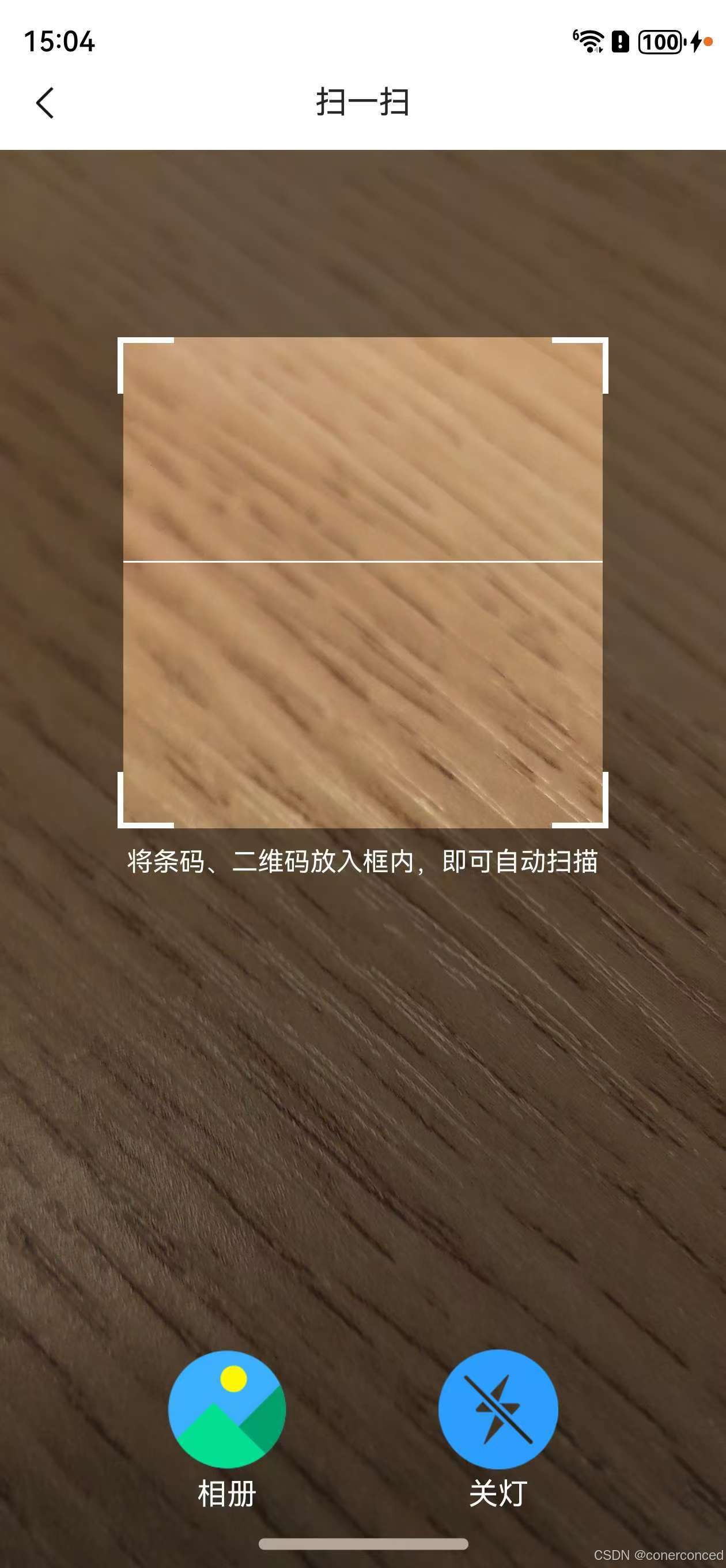
单码识别实现
- 组件导入
import { Scanner, ScannerController } from '@coner/Scanner';
- 基础使用
scanController: ScannerController = new ScannerController()

Scanner({
  controller: this.scanController,
  onScanResult: (code: ResultState, value: string) => {
    if (code == ResultState.Success) {
      promptAction.showToast({ message: value })
    }
  },
  onCameraReject: () => {
    promptAction.showToast({ message: '摄像头权限被拒绝' })
  }
}).layoutWeight(1)
多码识别实现
- 组件导入
import { ProScanner, ProScannerController } from '@ohos/Scanner'
- 基础使用
multiController: ProScannerController = new ProScannerController()

ProScanner({
  controller: this.multiController,
  onFindMultipleCode: (result: scanBarcode.ScanResult[]) => {
    promptAction.showToast({ message: '检测到' + result.length + '个二维码' })
  },
  onScanResult: (code: ResultState, value: string) => {
    if (code == ResultState.Success) {
      promptAction.showToast({ message: value })
    }
  }
})
  .layoutWeight(1)
组件安装
通过OpenHarmony包管理器安装扫描组件:
ohpm i @coner/scanner
Scanner组件属性详解
| 属性名 | 类型 | 默认值 | 说明 |
|---|---|---|---|
| albumsShow | boolean | true | 相册按钮是否显示 |
| albumsIcon | ResourceStr | $r('app.media.scanner_albums') | 相册按钮图标 |
| albumsIconSize | Length | 64 | 相册图标尺寸 |
| albumsText | string | '相册' | 相册按钮文字 |
| albumsTextSize | Length | 16 | 相册文字大小 |
| albumsTextColor | ResourceColor | Color.White | 相册文字颜色 |
| lightShow | boolean | true | 闪光灯按钮是否显示 |
| lightCloseIcon | ResourceStr | $r('app.media.scanner_light_close') | 闪光灯关闭图标 |
| lightOpenIcon | ResourceStr | $r('app.media.scanner_light_open') | 闪光灯开启图标 |
| lightIconSize | Length | 64 | 闪光灯图标尺寸 |
| lightOpenText | string | '开灯' | 闪光灯开启文字 |
| lightCloseText | string | '关灯' | 闪光灯关闭文字 |
| lightTextSize | Length | 16 | 闪光灯文字大小 |
| lightTextColor | ResourceColor | Color.White | 闪光灯文字颜色 |
| tipsShow | boolean | true | 提示文字是否显示 |
| tips | string | '将条码、二维码放入框内,即可自动扫描' | 提示文字内容 |
| tipsTextColor | ResourceColor | Color.White | 提示文字颜色 |
| tipsTextSize | Length | 14 | 提示文字大小 |
| tipsTopMargin | Length | 10 | 提示文字上边距 |
| maskColor | ResourceColor | '#7f000000' | 遮罩层颜色 |
| scannerSize | number | 256 | 扫描区域尺寸 |
| cornerLineWidth | number | 3 | 角落线条宽度 |
| cornerLineLength | number | 30 | 角落线条长度 |
| cornerLineColor | ResourceColor | Color.White | 角落线条颜色 |
| cornerLineShow | boolean | true | 是否显示角落线条 |
| scanTopMargin | number | 100 | 扫描区域上边距 |
| scanLineWidth | Length | 1 | 扫描线宽度 |
| scanLineLength | Length | '100%' | 扫描线长度 |
| scanLineColor | ResourceColor | Color.White | 扫描线颜色 |
| scanLineShow | boolean | true | 是否显示扫描线 |
| scanAnimTime | number | 1500 | 扫描动画时长 |
| scanIntervalTime | number | 1000 | 扫描间隔时间 |
| disableCheckArea | boolean | false | 是否禁用区域检测 |
| areaOffset | number | 100 | 二维码区域偏移量 |
| controller | ScannerController | this.scanController | 扫描控制器 |
| onScanResult | (code: ResultState, value: string) => void | undefined | 扫描结果回调 |
| onCameraGrant | () => void | undefined | 相机权限授权回调 |
| onCameraReject | () => void | undefined | 相机权限拒绝回调 |
ScannerController控制器方法
| 方法 | 参数 | 返回值 | 功能说明 |
|---|---|---|---|
| openLight | void | void | 开启闪光灯 |
| closeLight | void | void | 关闭闪光灯 |
| toggleLight | void | void | 切换闪光灯状态 |
| pickPhoto | void | void | 从相册选择图片识别 |
| setZoom | zoom: number | void | 设置镜头缩放比例 |
| getZoom | void | number | 获取当前缩放比例 |
| getLightStatus | void | boolean | 获取闪光灯状态 |
| releaseScan | void | void | 释放相机资源 |
| startScan | void | void | 启动扫描 |
| rescan | void | void | 重新开始扫描 |
| scanUri | uri: string | void | 扫描指定URI图片 |
| scanUrl | url: string | void | 扫描网络图片 |
| scanPixelMap | pixelMap: PixelMap | void | 扫描PixelMap图片 |
控制器使用示例
this.scanController.scanUrl(imageUrl) // 扫描结果将回调到组件的onScanResult方法
ProScanner组件属性-多码识别
| 属性名 | 类型 | 默认值 | 说明 |
|---|---|---|---|
| albumsShow | boolean | true | 相册按钮是否显示 |
| albumsIcon | ResourceStr | $r('app.media.scanner_albums') | 相册按钮图标 |
| albumsIconSize | Length | 64 | 相册图标尺寸 |
| albumsText | string | '相册' | 相册按钮文字 |
| albumsTextSize | Length | 16 | 相册文字大小 |
| albumsTextColor | ResourceColor | Color.White | 相册文字颜色 |
| lightShow | boolean | true | 闪光灯按钮是否显示 |
| lightCloseIcon | ResourceStr | $r('app.media.scanner_light_close') | 闪光灯关闭图标 |
| lightOpenIcon | ResourceStr | $r('app.media.scanner_light_open') | 闪光灯开启图标 |
| lightIconSize | Length | 64 | 闪光灯图标尺寸 |
| lightOpenText | string | '开灯' | 闪光灯开启文字 |
| lightCloseText | string | '关灯' | 闪光灯关闭文字 |
| lightTextSize | Length | 16 | 闪光灯文字大小 |
| lightTextColor | ResourceColor | Color.White | 闪光灯文字颜色 |
| scanIntervalTime | number | 1000 | 扫描间隔时间 |
| pointViewSize | number | 40 | 多码标记点大小 |
| pointViewColor | ResourceColor | '#4AA4F9' | 多码标记点颜色 |
| pointViewBorderWidth | number | 3 | 多码标记点边框宽度 |
| pointIcon | ResourceStr | $r('app.media.scanner_arrow_right') | 多码标记点图标 |
| pointIconSize | number | 26 | 多码标记点图标大小 |
| pointViewBorderColor | ResourceColor | Color.White | 多码标记点边框颜色 |
| pointViewLeftOffset | number | 20 | 多码标记点水平偏移 |
| pointViewTopOffset | number | 20 | 多码标记点垂直偏移 |
| pointView | CustomBuilder | 默认样式 | 多码标记点自定义UI |
| controller | ProScannerController | this.multiController | 扫描控制器 |
| onFindMultipleCode | (result: scanBarcode.ScanResult[]) => void | undefined | 多码检测结果回调 |
| onScanResult | (code: ResultState, value: string) => void | undefined | 单码扫描结果回调 |
| onCameraGrant | () => void | undefined | 相机权限授权回调 |
| onCameraReject | () => void | undefined | 相机权限拒绝回调 |
ProScannerController控制器
ProScannerController与ScannerController方法相同,此处不再赘述。
ScanUtil工具类
ScanUtil类用于在不使用Scanner组件的页面中执行图片扫描功能。
| 方法 | 参数 | 返回值 | 功能说明 |
|---|---|---|---|
| scanUri | uri: string | Promise | 扫描指定URI图片 |
| scanUrl | url: string | Promise | 扫描网络图片 |
| scanPixelMap | pixelMap: PixelMap | Promise | 扫描PixelMap图片 |
ScanUtil使用示例
ScanUtil.scanUrl(imageUrl)
  .then((result) => {
    promptAction.showToast({ message: result })
  })
  .catch((error: string) => {
    promptAction.showToast({ message: '扫描失败:' + error })
  })
权限声明
在entry模块的module.json5配置文件中添加以下权限声明:
{
  "module": {
    // ...
    "requestPermissions": [
      {
        "name": "ohos.permission.INTERNET"
      },
      {
        "name": "ohos.permission.CAMERA",
        "reason": "$string:reasonRequestCamera",
        "usedScene": {
          "abilities": ["EntryAbility"],
          "when": "inuse"
        }
      }
    ]
  }
}
单码识别UI自定义
Scanner({
  cornerLineShow: false, // 隐藏角落线条
  scanLineShow: false, // 隐藏扫描线
  albumsShow: false, // 隐藏相册按钮
  lightShow: false, // 隐藏闪光灯按钮
  tipsShow: false, // 隐藏提示文字
  maskColor: Color.Transparent, // 透明遮罩
  onScanResult: (code: ResultState, value: string) => {
    if (code == ResultState.Success) {
      promptAction.showToast({ message: value })
    }
  },
  onCameraReject: () => {
    promptAction.showToast({ message: '摄像头权限被拒绝' })
  }
})
多码识别UI自定义
自定义标记点样式
ProScanner({
  pointViewSize: 40,
  pointViewColor: '#4AA4F9',
  pointViewBorderWidth: 3,
  pointIcon: $r('app.media.custom_icon'),
  pointIconSize: 26,
  pointViewBorderColor: Color.White,
  pointViewLeftOffset: 20,
  pointViewTopOffset: 20,
})
完全自定义标记点UI
ProScanner({
  pointView: this.CustomPointView()
})
@Builder
CustomPointView() {
  // 自定义标记点UI实现
}
