在C# WinForm中通过NPOI处理Excel文件中的图片数据
需求:在WinForm应用中实现Excel数据导入功能,同时处理嵌入的图片资源。
虽然代码实现方式可能不同(我未深入研究具体实现),但参考了相关技术思路获取灵感http://www.wjhsh.net/IT-Ramon-p-13100039.html,通过修改文件后缀为Zip进行解压,解析XML文件中的图片位置信息及关联数据
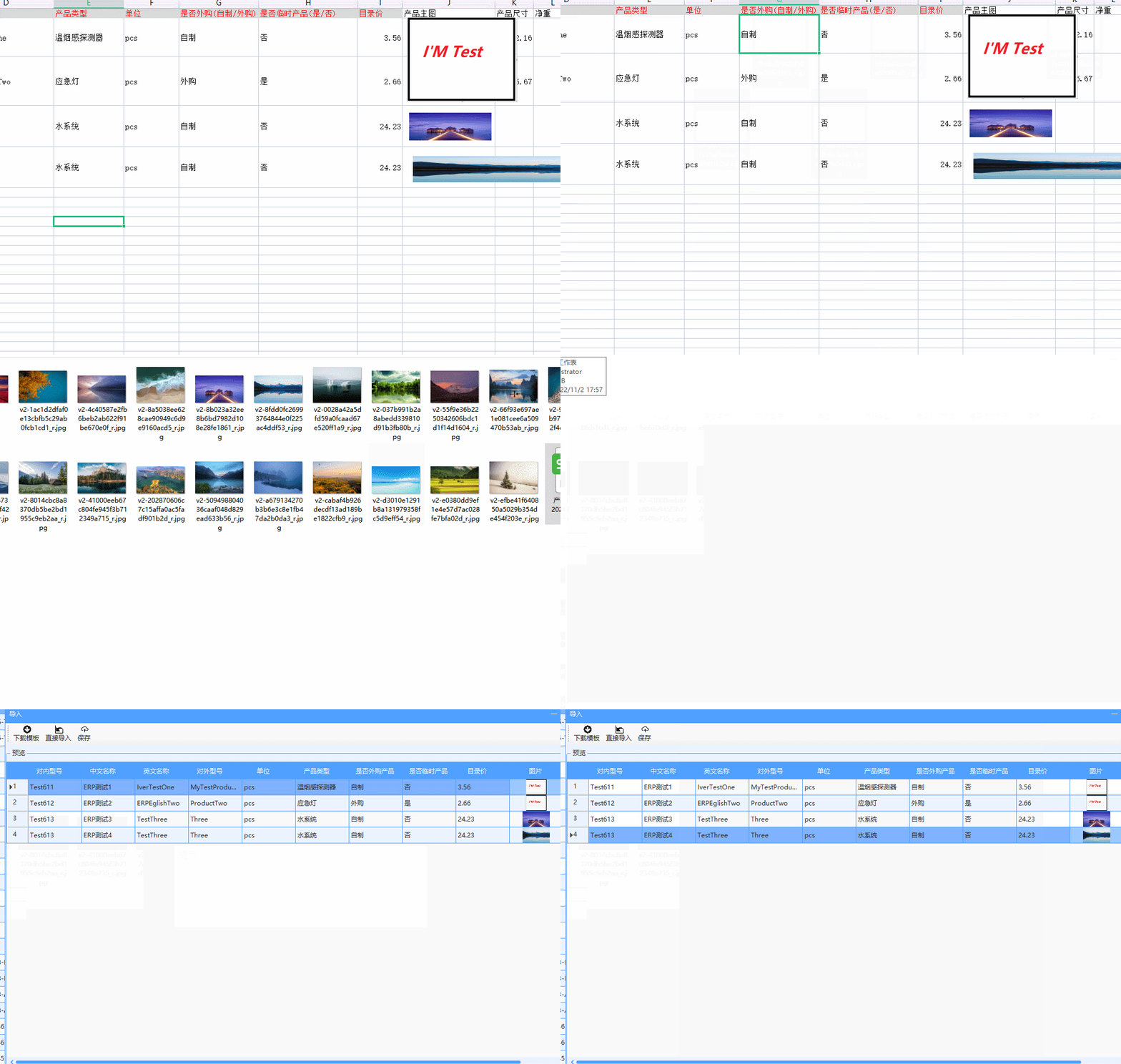
示例效果:
1、关键处理逻辑
        DataTable dataResult;
        private void ImportButton_Click(object sender, EventArgs e)
        {
            dataResult = null;
            string tempFileName = DateTime.Now.ToString("yyyyMMddHHmmss");
            string zipSuffix = ".zip";
            string cachePath = Path.Combine(Environment.CurrentDirectory, "Temp", "Cache");
            if (!Directory.Exists(cachePath)) Directory.CreateDirectory(cachePath);
            string zipFilePath = Path.Combine(cachePath, tempFileName + zipSuffix);
            string extractPath = Path.Combine(cachePath, tempFileName);

            OpenFileDialog fileDialog = new OpenFileDialog();
            fileDialog.Filter = "Excel文件(*.xls,*.xlsx)|*.xls;*.xlsx";
            fileDialog.FilterIndex = 0;
            fileDialog.RestoreDirectory = true;
            fileDialog.Title = "选择要导入的文件";
            //fileDialog.ShowDialog();
            if (fileDialog.ShowDialog() != DialogResult.OK) return;

            Common.ShowWaitForm();
            FileInfo sourceFile = new FileInfo(fileDialog.FileName);
            sourceFile.CopyTo(zipFilePath);

            try
            {
                ImageMetadata imageMeta = null;
                if (!Directory.Exists(extractPath)) Directory.CreateDirectory(extractPath);
                if (!ZipExtractor.Extract(zipFilePath, extractPath))
                {
                    Common.ShowErrorDialog("解压失败!");
                    LogHelper.WriteError("导入异常,解压操作失败:" + extractPath);
                    return;
                }
                else
                {
                    imageMeta = ExtractImagePaths(extractPath);
                }

                string errorMsg = "";
                dataResult = ExcelProcessor.ReadExcelData(fileDialog.FileName, imageMeta, ref errorMsg);
                if (!string.IsNullOrEmpty(errorMsg)) Common.ShowInfoDialog(errorMsg);
                if (dataResult == null || dataResult.Rows.Count <= 0)
                {
                    Common.ShowSuccessTip("未找到有效数据!");
                    return;
                }
                RefreshDataGrid();
            }
            catch (Exception ex)
            {
                Common.ShowErrorDialog("处理异常:" + ex.Message);
            }
            finally
            {
                Common.HideWaitForm();
            }
        }

        private ImageMetadata ExtractImagePaths(string extractDir)
        {
            string xmlPath = Path.Combine(extractDir, "xl", "drawings", "drawing1.xml");
            var xmlDoc = XDocument.Load(xmlPath);
            xmlDoc.Descendants().Attributes().Where(a => a.IsNamespaceDeclaration).Remove();
            foreach (var node in xmlDoc.Descendants()) node.Name = node.Name.LocalName;
            xmlDoc.Save(xmlPath);

            ImageMetadata metadata = XmlSerializer.Deserialize<ImageMetadata>(xmlPath);
            ImageRelationships relations = ExtractImageReferences(extractDir);

            if (metadata.AnchorItems.Count > 0)
            {
                foreach (var item in metadata.AnchorItems)
                {
                    item.ImageData = relations.Relationships
                        .FirstOrDefault(r => r.Id == item.BlipData.ImageId)?.Image;
                    item.ImagePath = relations.Relationships
                        .FirstOrDefault(r => r.Id == item.BlipData.ImageId)?.ImagePath;
                }
            }
            return metadata;
        }

        private ImageRelationships ExtractImageReferences(string extractDir)
        {
            string relsPath = Path.Combine(extractDir, "xl", "drawings", "_rels", "drawing1.xml.rels");
            FileInfo file = new FileInfo(relsPath);
            string newRelsPath = Path.Combine(extractDir, "xl", "drawings", "drawing1.xml");

            if (file.Exists) file.MoveTo(newRelsPath);

            var xmlDoc = XDocument.Load(newRelsPath);
            xmlDoc.Descendants().Attributes().Where(a => a.IsNamespaceDeclaration).Remove();
            foreach (var node in xmlDoc.Descendants()) node.Name = node.Name.LocalName;
            xmlDoc.Save(newRelsPath);

            ImageRelationships relationships = XmlSerializer.Deserialize<ImageRelationships>(newRelsPath);
            string drawingXmlPath = Path.Combine(extractDir, "xl", "drawings", "drawing1.xml");

            foreach (var rel in relationships.Relationships)
            {
                string fullPath = ResolvePath(drawingXmlPath, rel.Target);
                rel.ImagePath = fullPath;
                using (var stream = new FileStream(fullPath, FileMode.Open, FileAccess.Read))
                {
                    rel.Image = Image.FromStream(stream);
                }
            }
            return relationships;
        }

        private string ResolvePath(string baseDir, string relativePath)
        {
            string[] segments = relativePath.Split('/');
            string currentPath = baseDir;
            foreach (var segment in segments)
            {
                if (segment == "..")
                {
                    currentPath = Path.GetDirectoryName(currentPath);
                }
                else
                {
                    currentPath = Path.Combine(currentPath, segment);
                }
            }
            return currentPath;
        }
2、XML解析实体类定义
  #region 数据模型
    [Serializable]
    public class ImageMetadata
    {
        [XmlElement("twoCellAnchor")]
        public List<AnchorItem> AnchorItems { get; set; }
    }

    public class ImageRelationships
    {
        [XmlElement("Relationship")]
        public List<ImageReference> Relationships { get; set; }
    }
    #endregion
    #region 子级结构
    public class AnchorItem
    {
        [XmlElement("from")]
        public Position StartPos { get; set; }
        [XmlElement("to")]
        public Position EndPos { get; set; }
        [XmlElement("pic")]
        public ImageData ImageData { get; set; }
    }

    public class ImageData
    {
        [XmlElement("nvPicPr")]
        public ImageProperties Properties { get; set; }
        [XmlElement("blipFill")]
        public BlipData BlipData { get; set; }
    }

    public class ImageProperties
    {
        [XmlAttribute("id")]
        public string ImageId { get; set; }
        [XmlAttribute("name")]
        public string ImageName { get; set; }
        public Image Image { get; set; }
        public string ImagePath { get; set; }
    }

    public class BlipData
    {
        [XmlElement("blip")]
        public ImageReference Reference { get; set; }
    }

    public class ImageReference
    {
        [XmlAttribute("embed", Namespace = "http://schemas.openxmlformats.org/officeDocument/2006/relationships")]
        public string ImageId { get; set; }
    }

    public class Position
    {
        [XmlAttribute("col")]
        public int Column { get; set; }
        [XmlAttribute("row")]
        public int Row { get; set; }
    }
    #endregion
3、NPOI数据读取实现
private static ISheet ReadExcelSheet(string filePath)
        {
            IWorkbook workbook;
            string extension = Path.GetExtension(filePath).ToLower();
            using (FileStream stream = new FileStream(filePath, FileMode.Open, FileAccess.Read))
            {
                if (extension == ".xlsx") workbook = new XSSFWorkbook(stream);
                else if (extension == ".xls") workbook = new HSSFWorkbook(stream);
                else return null;

                return workbook.GetSheetAt(0);
            }
        }

        public static DataTable ReadExcelData(string filePath, ImageMetadata imageMeta, ref string errorMsg)
        {
            try
            {
                ISheet sheet = ReadExcelSheet(filePath);
                DataTable resultTable = new DataTable();
                resultTable.Columns.Add("ID", typeof(string));
                resultTable.Columns.Add("InternalCode", typeof(string));
                resultTable.Columns.Add("ExternalCode", typeof(string));
                resultTable.Columns.Add("ChineseName", typeof(string));
                resultTable.Columns.Add("EnglishName", typeof(string));
                resultTable.Columns.Add("ProductType", typeof(string));
                resultTable.Columns.Add("Unit", typeof(string));
                resultTable.Columns.Add("IsPurchased", typeof(string));
                resultTable.Columns.Add("IsTemporary", typeof(string));
                resultTable.Columns.Add("Price", typeof(decimal));
                resultTable.Columns.Add("Image", typeof(Image));
                resultTable.Columns.Add("Dimensions", typeof(string));
                resultTable.Columns.Add("Weight", typeof(string));
                resultTable.Columns.Add("ImagePath", typeof(string));

                for (int rowIndex = 1; rowIndex <= sheet.LastRowNum; rowIndex++)
                {
                    DataRow newRow = resultTable.NewRow();
                    IRow row = sheet.GetRow(rowIndex);
                    if (row == null) continue;

                    string internalCode = GetCellValue(row.GetCell(0));
                    if (string.IsNullOrEmpty(internalCode))
                    {
                        errorMsg += $"第{rowIndex}行【内部编码】不能为空!";
                        break;
                    }
                    newRow["InternalCode"] = internalCode;

                    string externalCode = GetCellValue(row.GetCell(1));
                    if (string.IsNullOrEmpty(externalCode))
                    {
                        errorMsg += $"第{rowIndex}行【外部编码】不能为空!";
                        break;
                    }
                    newRow["ExternalCode"] = externalCode;

                    // ...其他字段校验逻辑省略...

                    if (imageMeta != null && imageMeta.AnchorItems.Count > 0)
                    {
                        var matchingImages = imageMeta.AnchorItems
                            .Where(item => rowIndex >= item.StartPos.Row &&
                                         9 >= item.StartPos.Column &&
                                         rowIndex <= item.EndPos.Row &&
                                         9 <= item.EndPos.Column)
                            .ToList();

                        if (matchingImages.Count > 0)
                        {
                            newRow["Image"] = matchingImages[0].ImageData.Properties.Image;
                            newRow["ImagePath"] = matchingImages[0].ImageData.Properties.ImagePath;
                        }
                    }

                    resultTable.Rows.Add(newRow);
                }
                return resultTable;
            }
            catch (Exception ex)
            {
                LogHelper.WriteError(ex.ToString());
                throw;
            }
        }
4、数据持久化处理
  private void SaveButton_Click(object sender, EventArgs e)
        {
            List<ProductModel> productList = new List<ProductModel>();
            foreach (DataRow row in dataResult.Rows)
            {
                ProductModel model = new ProductModel();
                // 数据映射逻辑
                productList.Add(model);
            }

            if (productList.Count == 0)
            {
                Common.ShowInfoTip("未检测到可保存数据");
                return;
            }

            LoadingForm.Show(this, () => UploadProcess(productList), () => this.Close());
        }

        private void UploadProcess(List<ProductModel> products)
        {
            List<DatabaseCommand> commands = new List<DatabaseCommand>();
            foreach (var product in products)
            {
                product.ImagePath = FileUploader.UploadFile(product.ImagePath);
                commands.Add(ProductBusiness.AddCommand(product));
            }

            if (DatabaseTransaction.Execute(commands))
            {
                Common.ShowSuccessTip("数据导入完成");
                dataResult = null;
            }
            else
            {
                Common.ShowErrorDialog("数据保存失败");
            }
        }
操作流程:
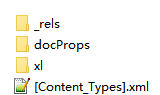
将Excel文件后缀修改为.zip并解压,得到包含以下结构的文件夹:
其中xl/drawings/drawing1.xml文件记录了图片位置信息和标识符,对应xl/drawings/_rels/drawing1.xml.rels文件中的路径映射关系:

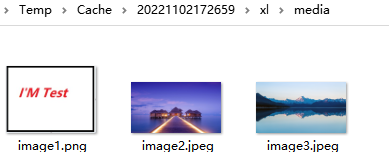
通过解析路径定位到xl/media/image1.png文件: