基于KMP与OpenHarmony的医疗健康风险评估系统
欢迎加入开源鸿蒙跨平台开发社区:https://openharmonycrossplatform.csdn.net
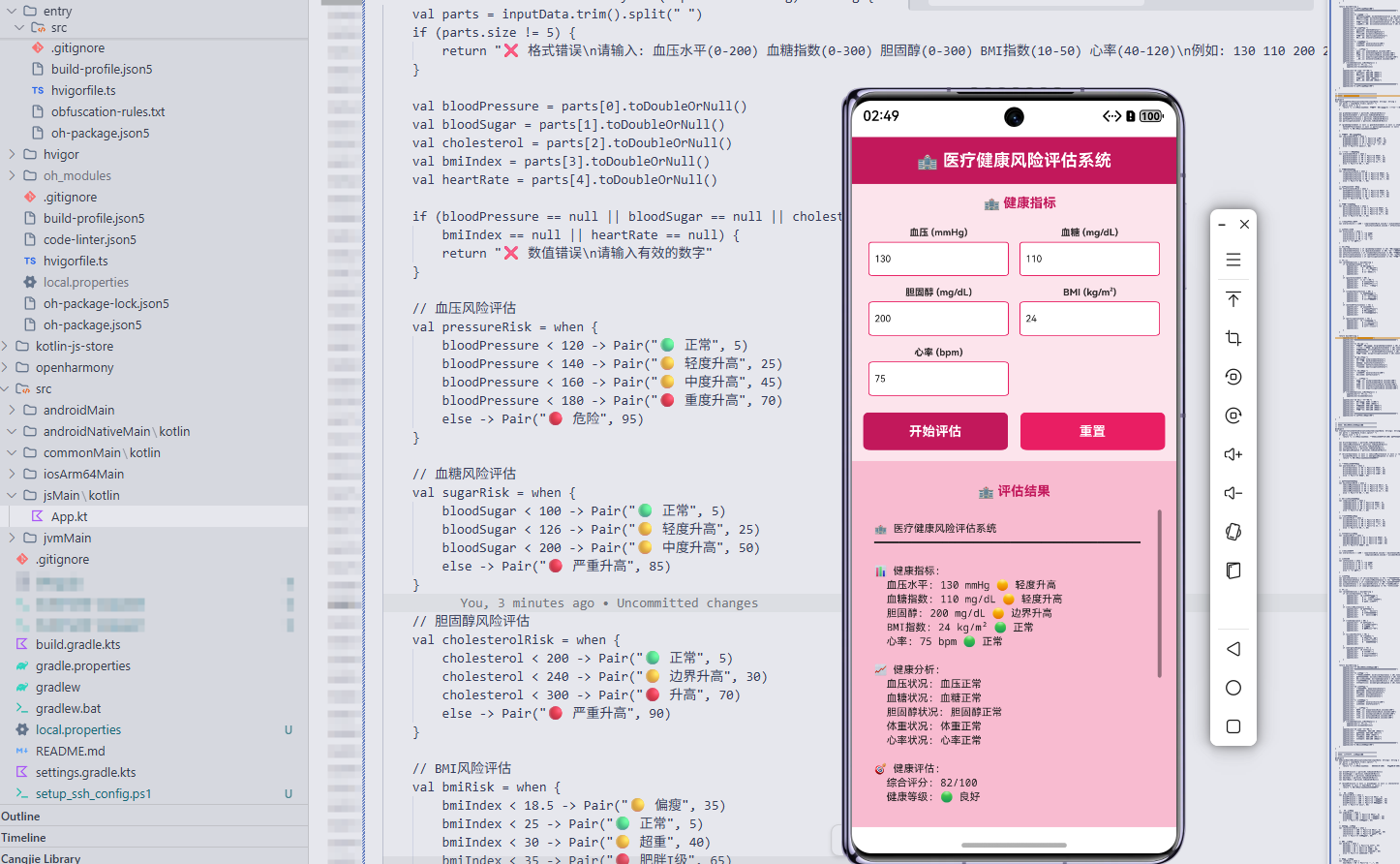
项目概述
本系统是一个基于 Kotlin Multiplatform(KMP)与 OpenHarmony 构建的医疗健康风险评估工具,旨在通过多维度指标分析个体健康状况。系统整合了身体健康、生活方式、疾病风险、检查频率和健康管理意识五大核心参数,利用统一逻辑引擎实现跨平台运行,适用于医院健康管理、体检中心风险筛查及公共卫生监测等场景。
传统健康评估依赖人工判断与周期性体检,存在滞后性和主观性问题。本方案采用可复用的算法内核,结合 ArkTS 在 OpenHarmony 设备上构建交互界面,并通过 KMP 将核心逻辑编译为 JavaScript 供 Web 端调用,确保各终端数据处理一致性,提升评估效率与科学性。
核心功能特性
- 五维健康指标分析:综合评估身体状态、生活习惯、潜在疾病风险、医疗参与度及自我管理能力,形成全面画像。
- 智能评分模型:采用加权融合机制计算总体健康得分,动态识别高风险人群并划分等级。
- 分级干预建议生成:根据风险级别输出定制化改善策略,涵盖锻炼、饮食、检查安排等方面。
- 健康潜力量化:提供"改善空间"指标,辅助制定优先级明确的健康优化路径。
技术架构设计
系统采用分层架构:
- Kotlin 共享逻辑层:使用 Kotlin 编写核心算法,通过
@JsExport注解暴露接口,支持 JS 调用。 - JavaScript 中间层:由 Kotlin 编译生成,作为 Web 应用的数据处理中枢。
- AkTS 前端展示层:在 OpenHarmony 终端实现用户输入与结果可视化,通过 import 引入 JS 模块完成逻辑调用。
核心算法实现(Kotlin)
@JsExport
fun evaluateHealthRisk(input: String): String {
    val values = input.trim().split(" ")
    if (values.size != 5) {
        return "输入格式错误\n请提供五个数值:\n身体健康 生活方式 疾病风险 检查频率 健康意识\n示例:75 80 70 85 78"
    }

    val bodyIndex = parseDouble(values[0])
    val lifeScore = parseDouble(values[1])
    val diseaseRisk = parseDouble(values[2])
    val checkFreq = parseDouble(values[3])
    val awareness = parseDouble(values[4])

    if (anyNull(bodyIndex, lifeScore, diseaseRisk, checkFreq, awareness)) {
        return "数据解析失败\n请输入有效数字"
    }

    listOf(bodyIndex, lifeScore, diseaseRisk, checkFreq, awareness).forEach {
        if (it < 0 || it > 100) {
            return "所有指标应在0-100之间"
        }
    }

    val scores = mapOf(
        "body" to bodyIndex.toInt(),
        "life" to lifeScore.toInt(),
        "disease" to diseaseRisk.toInt(),
        "check" to checkFreq.toInt(),
        "aware" to awareness.toInt()
    )

    val total = (
        scores["body"]!! * 0.25 +
        scores["life"]!! * 0.20 +
        scores["disease"]!! * 0.25 +
        scores["check"]!! * 0.20 +
        scores["aware"]!! * 0.10
    ).toInt()

    val level = when {
        total >= 90 -> "🟢 低风险"
        total >= 80 -> "🟡 较低风险"
        total >= 70 -> "🟠 中等风险"
        total >= 60 -> "🔴 较高风险"
        else -> "⚫ 高风险"
    }

    val potential = when {
        total >= 90 -> "极高"
        total >= 80 -> "高"
        total >= 70 -> "中"
        total >= 60 -> "低"
        else -> "极低"
    }

    val referenceCount = when {
        total >= 90 -> 5000
        total >= 80 -> 3000
        total >= 70 -> 1500
        total >= 60 -> 500
        else -> 100
    }

    val gaps = scores.mapValues { 100 - it.value }

    return buildString {
        appendLine("╔══════════════════════════════════╗")
        appendLine("║      🏥 健康风险分析报告         ║")
        appendLine("╚══════════════════════════════════╝")
        appendLine()
        appendLine("📊 指标详情")
        appendLine("━━━━━━━━━━━━━━━━━━━━━━━━━━━━━━━━━━━━━")
        appendLine("身体健康: ${"%.2f".format(bodyIndex)}%")
        appendLine("生活方式: ${"%.2f".format(lifeScore)}%")
        appendLine("疾病风险: ${"%.2f".format(diseaseRisk)}%")
        appendLine("检查频率: ${"%.2f".format(checkFreq)}%")
        appendLine("健康意识: ${"%.2f".format(awareness)}%")
        appendLine()

        appendLine("⭐ 各项评分")
        appendLine("━━━━━━━━━━━━━━━━━━━━━━━━━━━━━━━━━━━━━")
        scores.forEach { (k, v) ->
            appendLine("${mapKeyToLabel(k)}: $v/100")
        }
        appendLine()

        appendLine("🎯 综合结论")
        appendLine("━━━━━━━━━━━━━━━━━━━━━━━━━━━━━━━━━━━━━")
        appendLine("综合得分: $total/100")
        appendLine("风险等级: $level")
        appendLine("改善潜力: $potential")
        appendLine("参考人数: ${referenceCount}人")
        appendLine()

        appendLine("📈 提升空间")
        appendLine("━━━━━━━━━━━━━━━━━━━━━━━━━━━━━━━━━━━━━")
        gaps.forEach { (k, gap) ->
            appendLine("${mapKeyToLabel(k)}: ${"%.2f".format(gap.toDouble())}%")
        }
        appendLine()

        appendLine("💡 改善指引")
        appendLine("━━━━━━━━━━━━━━━━━━━━━━━━━━━━━━━━━━━━━")

        if (bodyIndex < 75) {
            appendLine("  💪 提升体质水平")
            appendLine("     • 规律运动")
            appendLine("     • 均衡膳食")
            appendLine("     • 作息规律")
        } else if (bodyIndex >= 85) {
            appendLine("  ✅ 体质优秀")
            appendLine("     • 巩固现有成果")
            appendLine("     • 探索进阶训练")
        }

        if (lifeScore < 75) {
            appendLine("  🏃 优化生活习惯")
            appendLine("     • 减少熬夜")
            appendLine("     • 戒烟限酒")
            appendLine("     • 心理调节")
        } else if (lifeScore >= 85) {
            appendLine("  ✅ 习惯良好")
            appendLine("     • 持续保持")
            appendLine("     • 影响他人")
        }

        if (diseaseRisk < 70) {
            appendLine("  ⚠️ 加强疾病防控")
            appendLine("     • 定期筛查")
            appendLine("     • 接种疫苗")
            appendLine("     • 监测慢病")
        } else if (diseaseRisk >= 85) {
            appendLine("  ✅ 风险可控")
            appendLine("     • 维持当前措施")
            appendLine("     • 关注新发风险")
        }

        if (checkFreq < 75) {
            appendLine("  🏥 提高检查频次")
            appendLine("     • 制定年度计划")
            appendLine("     • 使用提醒工具")
            appendLine("     • 关注异常信号")
        } else if (checkFreq >= 85) {
            appendLine("  ✅ 检查积极")
            appendLine("     • 继续坚持")
            appendLine("     • 扩展检测范围")
        }

        if (awareness < 70) {
            appendLine("  🧠 增强健康认知")
            appendLine("     • 学习医学知识")
            appendLine("     • 参与健康讲座")
            appendLine("     • 主动咨询医生")
        } else if (awareness >= 85) {
            appendLine("  ✅ 认知充分")
            appendLine("     • 分享经验")
            appendLine("     • 引导家庭成员")
        }

        appendLine()
        appendLine("📋 管理策略")
        appendLine("━━━━━━━━━━━━━━━━━━━━━━━━━━━━━━━━━━━━━")
        when {
            total < 60 -> {
                appendLine("⚫ 高风险 - 立即行动")
                appendLine("  1. 全面体检")
                appendLine("  2. 医生会诊")
                appendLine("  3. 制定方案")
                appendLine("  4. 定期复查")
            }
            total < 70 -> {
                appendLine("🔴 较高风险 - 逐步改进")
                appendLine("  1. 明确重点")
                appendLine("  2. 设定目标")
                appendLine("  3. 分阶段实施")
            }
            total < 80 -> {
                appendLine("🟠 中等风险 - 持续优化")
                appendLine("  1. 巩固优势")
                appendLine("  2. 补齐短板")
            }
            total < 90 -> {
                appendLine("🟡 较低风险 - 保持稳定")
                appendLine("  1. 维持现状")
                appendLine("  2. 年度复盘")
            }
            else -> {
                appendLine("🟢 低风险 - 标杆推广")
                appendLine("  1. 总结模式")
                appendLine("  2. 分享经验")
            }
        }

        appendLine()
        appendLine("───────────────────────────────────")
        appendLine("✅ 报告生成时间: ${System.currentTimeMillis()}")
    }
}

private fun mapKeyToLabel(key: String) = when (key) {
    "body" -> "健康评分"
    "life" -> "生活评分"
    "disease" -> "风险评分"
    "check" -> "检查评分"
    "aware" -> "意识评分"
    else -> key
}

private fun parseDouble(s: String) = try { s.toDouble() } catch (e: NumberFormatException) { null }

private fun anyNull(vararg nums: Double?) = nums.any { it == null }
AkTS 页面实现
以下为 OpenHarmony 端的 UI 实现,包含表单输入、按钮交互与结果展示:
import { evaluateHealthRisk } from './healthEngine'

@Entry
@Component
struct HealthEvaluationPage {
  @State bodyValue: string = '75'
  @State lifeValue: string = '80'
  @State diseaseValue: string = '70'
  @State checkValue: string = '85'
  @State awareValue: string = '78'
  @State output: string = ''
  @State loading: boolean = false

  build() {
    Column() {
      // 标题栏
      Row() {
        Text('🏥 健康风险评估')
          .fontSize(20)
          .fontWeight(FontWeight.Bold)
          .fontColor(Color.White)
      }
      .width('100%')
      .height(60)
      .backgroundColor('#0097A7')
      .justifyContent(FlexAlign.Center)
      .padding({ left: 16, right: 16 })

      Scroll() {
        Column() {
          // 输入区域
          Column() {
            Text('📊 输入健康数据')
              .fontSize(16)
              .fontWeight(FontWeight.Bold)
              .fontColor('#0097A7')
              .margin({ bottom: 12 })
              .padding({ left: 12, top: 12 })

            Grid() {
              ForEach([[
                { label: '身体健康', value: this.bodyValue, bind: $bodyValue },
                { label: '生活方式', value: this.lifeValue, bind: $lifeValue },
                { label: '疾病风险', value: this.diseaseValue, bind: $diseaseValue },
                { label: '检查频率', value: this.checkValue, bind: $checkValue },
                { label: '健康意识', value: this.awareValue, bind: $awareValue }
              ]], item => {
                Column() {
                  Text(item.label + '(%)')
                    .fontSize(12)
                    .fontWeight(FontWeight.Bold)
                    .margin({ bottom: 4 })
                  TextInput({ text: item.value, placeholder: '请输入' })
                    .onChange((value) => this.updateValue(item.bind, value))
                    .height(40)
                    .width('100%')
                    .backgroundColor(Color.White)
                    .border({ width: 1, color: '#0097A7' })
                    .borderRadius(4)
                    .padding(8)
                    .fontSize(12)
                }.width('48%').padding(6)
              }, item => item.label)
            }
            .columnsTemplate('1fr 1fr')
            .width('100%')
            .padding({ left: 6, right: 6, bottom: 12 })
          }
          .width('100%')
          .padding(12)
          .backgroundColor('#B2EBF2')
          .borderRadius(8)
          .margin({ bottom: 12 })

          // 操作按钮
          Row() {
            Button('开始分析')
              .width('48%')
              .height(44)
              .fontSize(14)
              .fontWeight(FontWeight.Bold)
              .backgroundColor('#0097A7')
              .onClick(() => this.analyze())
            Blank().width('4%')
            Button('重置')
              .width('48%')
              .height(44)
              .fontSize(14)
              .fontWeight(FontWeight.Bold)
              .backgroundColor('#00BCD4')
              .onClick(() => this.resetForm())
          }
          .width('100%')
          .justifyContent(FlexAlign.Center)
          .padding({ left: 12, right: 12, bottom: 12 })

          // 结果展示
          Column() {
            Text('📋 分析结果')
              .fontSize(16)
              .fontWeight(FontWeight.Bold)
              .fontColor('#0097A7')
              .margin({ bottom: 12 })
              .padding({ left: 12, right: 12, top: 12 })

            if (this.loading) {
              Column() {
                LoadingProgress().color('#0097A7').size(50)
                Text('分析中...')
                  .fontSize(14)
                  .fontColor('#0097A7')
                  .margin({ top: 16 })
              }
              .width('100%')
              .height(200)
              .justifyContent(FlexAlign.Center)
              .alignItems(HorizontalAlign.Center)
            } else if (this.output) {
              Scroll() {
                Text(this.output)
                  .fontSize(11)
                  .fontColor('#0097A7')
                  .fontFamily('monospace')
                  .width('100%')
                  .padding(12)
                  .lineHeight(1.6)
              }
              .width('100%')
              .height(400)
            } else {
              Column() {
                Text('🏥').fontSize(64).opacity(0.2)
                Text('暂无结果')
                  .fontSize(14)
                  .fontColor('#0097A7')
                Text('填写数据后点击【开始分析】')
                  .fontSize(12)
                  .fontColor('#00BCD4')
                  .margin({ top: 8 })
              }
              .width('100%')
              .height(200)
              .justifyContent(FlexAlign.Center)
              .alignItems(HorizontalAlign.Center)
            }
          }
          .layoutWeight(1)
          .width('100%')
          .padding(12)
          .backgroundColor('#F5F5F5')
          .borderRadius(8)
        }
        .width('100%')
        .padding(12)
      }
      .layoutWeight(1)
    }
    .width('100%')
    .height('100%')
    .backgroundColor('#FAFAFA')
  }

  private updateValue(bind: any, value: string) {
    bind(value.replace(/[^0-9.]/g, ''))
  }

  private analyze() {
    const inputs = [this.bodyValue, this.lifeValue, this.diseaseValue, this.checkValue, this.awareValue]
    if (inputs.some(v => !v)) {
      this.output = '❌ 请填写全部字段'
      return
    }

    this.loading = true
    setTimeout(() => {
      try {
        const inputStr = inputs.join(' ')
        this.output = evaluateHealthRisk(inputStr)
      } catch (err) {
        this.output = `❌ 执行异常: ${err}`
      } finally {
        this.loading = false
      }
    }, 600)
  }

  private resetForm() {
    Object.assign(this, {
      bodyValue: '75',
      lifeValue: '80',
      diseaseValue: '70',
      checkValue: '85',
      awareValue: '78',
      output: '',
      loading: false
    })
  }
}
部署流程
- Kotlin 编译:通过 Gradle 插件将共享模块编译为 JS 文件。
- 前端集成:将生成的 JS 导入 ArkTS 工程,使用
import引用函数。 - 应用打包:构建 hsp 或 hap 包,部署至 OpenHarmony 设备。
- Web 复用:同一份 JS 可直接嵌入网页,实现跨端一致体验。
应用场景
- 医院健康管理中心进行群体风险筛查
- 社区卫生服务中心开展居民健康档案分析
- 企业员工体检后的个性化健康指导
- 智能穿戴设备联动实时健康预警
总结与展望
本系统展示了 KMP 与 OpenHarmony 协同开发的优势:一次编写核心逻辑,多端高效复用。未来可进一步接入生理传感器数据、融合机器学习模型预测慢性病趋势,并与电子病历系统对接,打造闭环式智慧健康管理平台。
