基于Fragment与ViewPager实现微信风格页面切换
在Android开发中,实现类似微信5.0的滑动切换界面,常被误认为依赖TabHost,实则核心是通过Fragment配合ViewPager完成。这种设计不仅提升了用户体验,也体现了对UI交互逻辑的深入理解。本文将详细解析如何使用Fragment与ViewPager构建一个可动态切换、支持颜色渐变和文本高亮的底部导航栏。
最终效果如下所示:
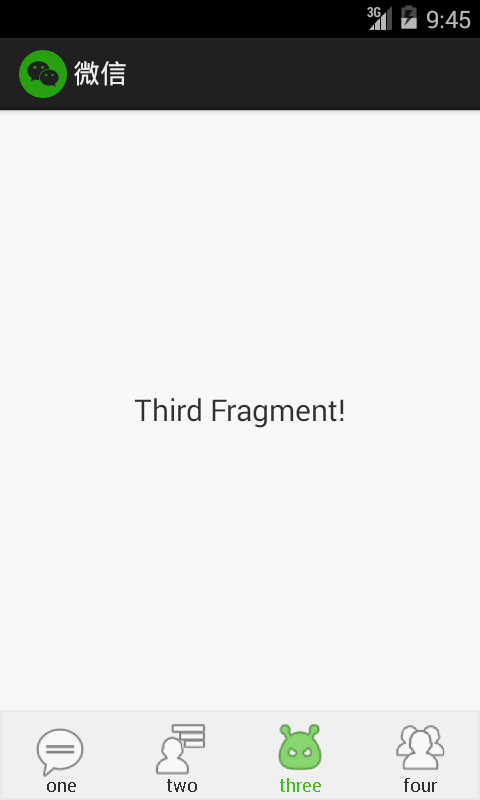
一、自定义控件:带颜色过渡的图标按钮
我们首先创建一个自定义视图,用于呈现底部导航图标,并支持在滑动过程中实现颜色渐变与文字叠加效果。
public class DynamicIconWithText extends View {

    private Bitmap iconBitmap;
    private Paint paint;
    private Rect iconRect;
    private String label = "首页";
    private int textColor = 0xFF555555;
    private int highlightColor = 0xFF45C01A;
    private float alpha = 0f;
    private Paint textPaint;
    private Rect textBounds = new Rect();

    public DynamicIconWithText(Context context) {
        super(context);
        init();
    }

    public DynamicIconWithText(Context context, AttributeSet attrs) {
        super(context, attrs);
        TypedArray a = context.getTheme().obtainStyledAttributes(attrs,
                R.styleable.DynamicIconView, 0, 0);

        try {
            iconBitmap = ((BitmapDrawable) a.getDrawable(R.styleable.DynamicIconView_icon)).getBitmap();
            highlightColor = a.getColor(R.styleable.DynamicIconView_highlight_color, 0xFF45C01A);
            label = a.getString(R.styleable.DynamicIconView_label);
            int textSize = a.getDimensionPixelSize(R.styleable.DynamicIconView_text_size, (int) TypedValue.applyDimension(TypedValue.COMPLEX_UNIT_SP, 10, getResources().getDisplayMetrics()));
            textPaint.setTextSize(textSize);
        } finally {
            a.recycle();
        }
        init();
    }

    private void init() {
        paint = new Paint(Paint.ANTI_ALIAS_FLAG | Paint.DITHER_FLAG);
        textPaint = new Paint(Paint.ANTI_ALIAS_FLAG);
        textPaint.setColor(textColor);
        textPaint.getTextBounds(label, 0, label.length(), textBounds);
    }

    @Override
    protected void onMeasure(int widthMeasureSpec, int heightMeasureSpec) {
        super.onMeasure(widthMeasureSpec, heightMeasureSpec);
        int size = Math.min(getMeasuredWidth(), getMeasuredHeight());
        int iconSize = Math.min(size - getPaddingLeft() - getPaddingRight(),
                size - getPaddingTop() - getPaddingBottom() - textBounds.height());

        int left = (getMeasuredWidth() - iconSize) / 2;
        int top = (getMeasuredHeight() - textBounds.height() - iconSize) / 2;
        iconRect = new Rect(left, top, left + iconSize, top + iconSize);
    }

    @Override
    protected void onDraw(Canvas canvas) {
        int alphaValue = (int) (255 * alpha);
        canvas.drawBitmap(iconBitmap, null, iconRect, null);

        // 绘制高亮层
        Bitmap overlay = Bitmap.createBitmap(getMeasuredWidth(), getMeasuredHeight(), Bitmap.Config.ARGB_8888);
        Canvas overlayCanvas = new Canvas(overlay);
        paint.setColor(highlightColor);
        paint.setAlpha(alphaValue);
        overlayCanvas.drawRect(iconRect, paint);
        paint.setXfermode(new PorterDuffXfermode(PorterDuff.Mode.DST_IN));
        paint.setAlpha(255);
        overlayCanvas.drawBitmap(iconBitmap, null, iconRect, paint);
        canvas.drawBitmap(overlay, 0, 0, null);

        // 绘制原始文字(透明)
        textPaint.setColor(0x333333);
        textPaint.setAlpha(255 - alphaValue);
        canvas.drawText(label, iconRect.centerX() - textBounds.width() / 2,
                iconRect.bottom + textBounds.height(), textPaint);

        // 绘制高亮文字
        textPaint.setColor(highlightColor);
        textPaint.setAlpha(alphaValue);
        canvas.drawText(label, iconRect.centerX() - textBounds.width() / 2,
                iconRect.bottom + textBounds.height(), textPaint);
    }

    public void setHighlightAlpha(float value) {
        this.alpha = value;
        invalidate();
    }

    public void setIconResource(int resId) {
        this.iconBitmap = BitmapFactory.decodeResource(getResources(), resId);
        invalidate();
    }

    public void setHighlightColor(int color) {
        this.highlightColor = color;
        invalidate();
    }

    @Override
    protected Parcelable onSaveInstanceState() {
        Bundle bundle = new Bundle();
        bundle.putParcelable("super_state", super.onSaveInstanceState());
        bundle.putFloat("alpha", alpha);
        return bundle;
    }

    @Override
    protected void onRestoreInstanceState(Parcelable state) {
        if (state instanceof Bundle) {
            Bundle bundle = (Bundle) state;
            alpha = bundle.getFloat("alpha");
            super.onRestoreInstanceState(bundle.getParcelable("super_state"));
        } else {
            super.onRestoreInstanceState(state);
        }
    }
}
二、定义自定义属性
在 res/values/attrs.xml 中声明自定义属性:
<resources>
    <attr name="icon" format="reference"/>
    <attr name="highlight_color" format="color"/>
    <attr name="label" format="string"/>
    <attr name="text_size" format="dimension"/>

    <declare-styleable name="DynamicIconView">
        <attr name="icon"/>
        <attr name="highlight_color"/>
        <attr name="label"/>
        <attr name="text_size"/>
    </declare-styleable>
</resources>
三、底部背景样式
在 res/drawable/tab_bg.xml 中定义底部栏背景:
<?xml version="1.0" encoding="utf-8"?>
<shape xmlns:android="http://schemas.android.com/apk/res/android">
    <solid android:color="#F7F7F7"/>
    <stroke android:width="1dp" android:color="#eee"/>
</shape>
四、字符串资源配置
在 res/values/strings.xml 中添加标签:
<resources>
    <string name="app_name">微信</string>
    <string name="tab_home">首页</string>
    <string name="tab_contacts">联系人</string>
    <string name="tab_discover">发现</string>
    <string name="tab_profile">我</string>
</resources>
五、主布局文件
res/layout/activity_main.xml:
<LinearLayout xmlns:android="http://schemas.android.com/apk/res/android"
    xmlns:app="http://schemas.android.com/apk/res-auto"
    android:layout_width="match_parent"
    android:layout_height="match_parent"
    android:orientation="vertical">

    <android.support.v4.view.ViewPager
        android:id="@+id/view_pager"
        android:layout_width="match_parent"
        android:layout_height="0dp"
        android:layout_weight="1"/>

    <LinearLayout
        android:layout_width="match_parent"
        android:layout_height="60dp"
        android:background="@drawable/tab_bg"
        android:orientation="horizontal">

        <com.example.dynamictabs.DynamicIconWithText
            android:id="@+id/indicator_home"
            android:layout_width="0dp"
            android:layout_height="match_parent"
            android:layout_weight="1"
            android:padding="5dp"
            app:icon="@drawable/ic_home"
            app:label="@string/tab_home"
            app:text_size="12sp"/>

        <com.example.dynamictabs.DynamicIconWithText
            android:id="@+id/indicator_contacts"
            android:layout_width="0dp"
            android:layout_height="match_parent"
            android:layout_weight="1"
            android:padding="5dp"
            app:icon="@drawable/ic_contacts"
            app:label="@string/tab_contacts"
            app:text_size="12sp"/>

        <com.example.dynamictabs.DynamicIconWithText
            android:id="@+id/indicator_discover"
            android:layout_width="0dp"
            android:layout_height="match_parent"
            android:layout_weight="1"
            android:padding="5dp"
            app:icon="@drawable/ic_discover"
            app:label="@string/tab_discover"
            app:text_size="12sp"/>

        <com.example.dynamictabs.DynamicIconWithText
            android:id="@+id/indicator_profile"
            android:layout_width="0dp"
            android:layout_height="match_parent"
            android:layout_weight="1"
            android:padding="5dp"
            app:icon="@drawable/ic_profile"
            app:label="@string/tab_profile"
            app:text_size="12sp"/>
    </LinearLayout>
</LinearLayout>
六、Fragment实现
每个页面由独立的Fragment承载:
public class PageFragment extends Fragment {
    private String title;

    public static PageFragment newInstance(String title) {
        PageFragment fragment = new PageFragment();
        Bundle args = new Bundle();
        args.putString("title", title);
        fragment.setArguments(args);
        return fragment;
    }

    @Override
    public void onCreate(Bundle savedInstanceState) {
        super.onCreate(savedInstanceState);
        if (getArguments() != null) {
            title = getArguments().getString("title");
        }
    }

    @Override
    public View onCreateView(LayoutInflater inflater, ViewGroup container, Bundle savedInstanceState) {
        TextView textView = new TextView(getActivity());
        textView.setText(title);
        textView.setGravity(Gravity.CENTER);
        textView.setTextSize(18);
        textView.setBackgroundColor(Color.WHITE);
        return textView;
    }
}
七、主Activity逻辑
MainActivity.java:
public class MainActivity extends FragmentActivity implements ViewPager.OnPageChangeListener, View.OnClickListener {

    private ViewPager viewPager;
    private List<Fragment> fragments;
    private FragmentStatePagerAdapter adapter;
    private List<DynamicIconWithText> indicators;

    @Override
    protected void onCreate(Bundle savedInstanceState) {
        super.onCreate(savedInstanceState);
        setContentView(R.layout.activity_main);

        viewPager = findViewById(R.id.view_pager);
        initFragments();
        viewPager.setAdapter(adapter);
        viewPager.addOnPageChangeListener(this);

        initIndicators();
    }

    private void initFragments() {
        fragments = new ArrayList<>();
        String[] titles = {"首页", "联系人", "发现", "我的"};
        for (String title : titles) {
            fragments.add(PageFragment.newInstance(title));
        }
        adapter = new FragmentStatePagerAdapter(getSupportFragmentManager()) {
            @Override
            public int getCount() {
                return fragments.size();
            }

            @Override
            public Fragment getItem(int position) {
                return fragments.get(position);
            }
        };
    }

    private void initIndicators() {
        indicators = new ArrayList<>();
        DynamicIconWithText home = findViewById(R.id.indicator_home);
        DynamicIconWithText contacts = findViewById(R.id.indicator_contacts);
        DynamicIconWithText discover = findViewById(R.id.indicator_discover);
        DynamicIconWithText profile = findViewById(R.id.indicator_profile);

        indicators.add(home);
        indicators.add(contacts);
        indicators.add(discover);
        indicators.add(profile);

        home.setOnClickListener(this);
        contacts.setOnClickListener(this);
        discover.setOnClickListener(this);
        profile.setOnClickListener(this);

        home.setHighlightAlpha(1.0f);
    }

    @Override
    public void onPageScrolled(int position, float positionOffset, int positionOffsetPixels) {
        if (positionOffset > 0) {
            DynamicIconWithText left = indicators.get(position);
            DynamicIconWithText right = indicators.get(position + 1);
            left.setHighlightAlpha(1 - positionOffset);
            right.setHighlightAlpha(positionOffset);
        }
    }

    @Override
    public void onPageSelected(int position) {
        resetAllIndicators();
        indicators.get(position).setHighlightAlpha(1.0f);
    }

    @Override
    public void onPageScrollStateChanged(int state) {}

    @Override
    public void onClick(View v) {
        resetAllIndicators();
        switch (v.getId()) {
            case R.id.indicator_home:
                viewPager.setCurrentItem(0, false);
                indicators.get(0).setHighlightAlpha(1.0f);
                break;
            case R.id.indicator_contacts:
                viewPager.setCurrentItem(1, false);
                indicators.get(1).setHighlightAlpha(1.0f);
                break;
            case R.id.indicator_discover:
                viewPager.setCurrentItem(2, false);
                indicators.get(2).setHighlightAlpha(1.0f);
                break;
            case R.id.indicator_profile:
                viewPager.setCurrentItem(3, false);
                indicators.get(3).setHighlightAlpha(1.0f);
                break;
        }
    }

    private void resetAllIndicators() {
        for (DynamicIconWithText indicator : indicators) {
            indicator.setHighlightAlpha(0f);
        }
    }
}
至此,一个具备滑动切换、动态高亮、点击响应的微信式界面已完整实现。
