Android中TabHost实现多标签页面切换
TabHost实现标签页切换功能
在Android应用开发中,由于移动设备屏幕尺寸的限制,我们经常需要在有限的屏幕空间内展示多个功能模块。TabHost组件提供了一种便捷的方式来实现标签页切换效果,可以在同一个Activity中展示多个子页面,用户通过点击不同的标签即可切换显示内容。
下面是实现后的效果预览:
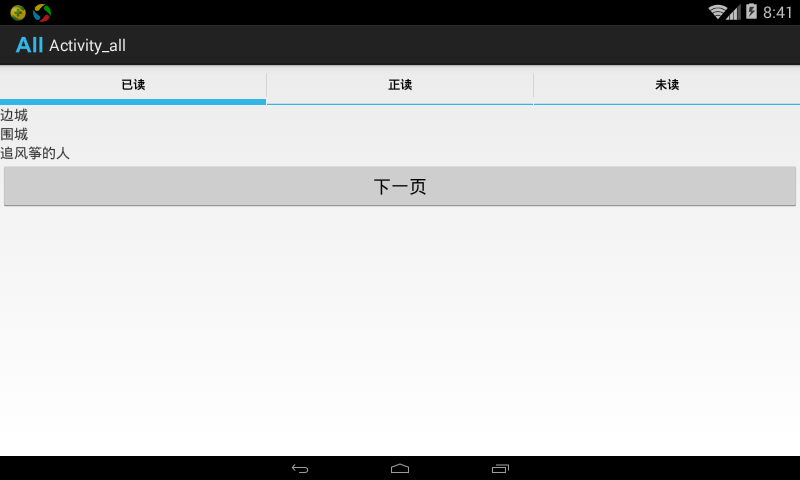
接下来介绍两种常用的实现方式:
方式一:本地视图切换模式
首先创建布局文件,定义TabHost和各个标签页的内容:
<RelativeLayout xmlns:android="http://schemas.android.com/apk/res/android"
    xmlns:tools="http://schemas.android.com/tools"
    android:layout_width="match_parent"
    android:layout_height="match_parent"
    tools:context=".MainActivity" >

    <TabHost
        android:id="@+id/musicTabHost"
        android:layout_width="wrap_content"
        android:layout_height="wrap_content"
        >
        <LinearLayout
            android:id="@+id/localMusicContainer"
            android:orientation="vertical"
            android:layout_height="wrap_content"
            android:layout_width="wrap_content"
            >
            <TextView
                android:text="流行音乐"
                android:layout_width="wrap_content"
                android:layout_height="wrap_content"
                />
            <TextView
                android:text="经典老歌"
                android:layout_width="wrap_content"
                android:layout_height="wrap_content"
                />
            <TextView
                android:text="轻音乐"
                android:layout_width="wrap_content"
                android:layout_height="wrap_content"
                />
        </LinearLayout>

        <LinearLayout
            android:id="@+id/onlineMusicContainer"
            android:orientation="vertical"
            android:layout_height="wrap_content"
            android:layout_width="wrap_content"
            >
            <TextView
                android:text="网络热歌"
                android:layout_width="wrap_content"
                android:layout_height="wrap_content"
                />
            <TextView
                android:text="新歌推荐"
                android:layout_width="wrap_content"
                android:layout_height="wrap_content"
                />
            <TextView
                android:text="排行榜"
                android:layout_width="wrap_content"
                android:layout_height="wrap_content"
                />
        </LinearLayout>

        <LinearLayout
            android:id="@+id/favoriteMusicContainer"
            android:orientation="vertical"
            android:layout_height="wrap_content"
            android:layout_width="wrap_content"
            >
            <TextView
                android:text="我喜欢的音乐"
                android:layout_width="wrap_content"
                android:layout_height="wrap_content"
                />
            <TextView
                android:text="收藏列表"
                android:layout_width="wrap_content"
                android:layout_height="wrap_content"
                />
            <TextView
                android:text="最近播放"
                android:layout_width="wrap_content"
                android:layout_height="wrap_content"
                />
        </LinearLayout>
    </TabHost>

</RelativeLayout>
对应的Activity代码实现:
public class MusicPlayerActivity extends TabActivity{
    private TabHost musicTabHost = null;

    @Override
    protected void onCreate(Bundle savedInstanceState) {
        super.onCreate(savedInstanceState);
        musicTabHost = getTabHost();
        LayoutInflater.from(this).inflate(R.layout.music_layout, musicTabHost.getTabContentView(), true);

        musicTabHost.addTab(musicTabHost.newTabSpec("local").setIndicator("本地音乐").setContent(R.id.localMusicContainer));
        musicTabHost.addTab(musicTabHost.newTabSpec("online").setIndicator("在线音乐").setContent(R.id.onlineMusicContainer));
        musicTabHost.addTab(musicTabHost.newTabSpec("favorite").setIndicator("我的收藏").setContent(R.id.favoriteMusicContainer));
    }
}
以上代码实现了最基本的本地内容切换功能。
方式二:Intent跳转模式
这种方式允许点击标签时跳转到其他Activity,首先创建布局文件:
<RelativeLayout xmlns:android="http://schemas.android.com/apk/res/android"
    xmlns:tools="http://schemas.android.com/tools"
    android:layout_width="match_parent"
    android:layout_height="match_parent"
    tools:context="${relativePackage}.${activityClass}" >
    <TabHost
        android:id="@android:id/tabhost"
        android:layout_width="match_parent"
        android:layout_height="match_parent">
        <LinearLayout
            android:orientation="vertical"
            android:layout_width="match_parent"
            android:layout_height="match_parent"
            >
            <FrameLayout
                android:id="@+id/contentFrame"
                android:layout_width="match_parent"
                android:layout_height="match_parent"
                android:padding="5dp"
                />
            <TabWidget
                android:layout_alignParentBottom="true"
                android:id="@+id/tabWidget"
                android:layout_width="wrap_content"
                android:layout_height="wrap_content"
                />
        </LinearLayout>
    </TabHost>
</RelativeLayout>
Activity中的实现逻辑:
public class MainTabActivity extends TabActivity {

    @Override
    protected void onCreate(Bundle savedInstanceState) {
        super.onCreate(savedInstanceState);

        Resources resources = getResources();
        TabHost tabHost = getTabHost();
        TabHost.TabSpec tabSpec;
        Intent intent;

        LayoutInflater.from(this).inflate(R.layout.main_tab_layout, tabHost.getTabContentView(), true);

        intent = new Intent().setClass(MainTabActivity.this, DialerActivity.class);
        tabHost.addTab(tabHost.newTabSpec("dialer").setIndicator("拨号", resources.getDrawable(R.drawable.ic_tab_dialer))
        .setContent(intent));

        intent = new Intent().setClass(MainTabActivity.this, ContactsActivity.class);

        tabSpec = tabHost.newTabSpec("contacts").setIndicator("联系人", resources.getDrawable(R.drawable.ic_tab_contacts))
                .setContent(intent);
        tabHost.addTab(tabSpec);

        intent = new Intent().setClass(MainTabActivity.this, CallLogActivity.class);

        tabSpec = tabHost.newTabSpec("calllog").setIndicator("通话记录", resources.getDrawable(R.drawable.ic_tab_calllog))
                .setContent(intent);
        tabHost.addTab(tabSpec);

        tabHost.setCurrentTab(1);

    }
}
在使用图片资源作为标签图标时,需要创建相应的选择器配置文件来实现选中/未选中状态的切换效果:
<?xml version="1.0" encoding="UTF-8"?>
<selector xmlns:android="http://schemas.android.com/apk/res/android">
    <item android:drawable="@drawable/ic_tab_contacts_grey"
          android:state_selected="true" />
    <item android:drawable="@drawable/ic_tab_contacts_white"
        android:state_selected="false" />
</selector>
上述两种实现方式可以根据实际需求选择:第一种适合内容较少且不需要跳转到其他页面的场景;第二种则适用于需要显示独立Activity的复杂场景。
