WPF多值绑定与IMultiValueConverter转换器实战详解
在WPF数据绑定中,当目标属性的值需要依赖于多个源属性时,单一的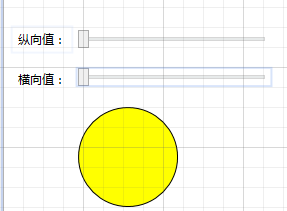
 ]]>
]]>
IValueConverter便无法满足需求。此时,我们需要借助IMultiValueConverter接口配合MultiBinding来实现多值绑定与转换。其核心逻辑与单值转换器类似,但Convert方法接收的是一个对象数组,包含了所有绑定源的值。
场景一:基于双通道流量对比的状态指示灯
假设我们需要一个状态指示灯,其颜色由纵向和横向两个通道的流量数值决定:若纵向流量大于横向流量,指示灯显示绿色;若小于则显示红色;两者相等时显示黄色。
1. 实现多值转换器
首先,定义一个实现IMultiValueConverter接口的转换器类。在Convert方法中,我们将接收到的对象数组解析为具体的数值类型,并进行比较。
using System;
using System.Globalization;
using System.Windows.Data;
using System.Windows.Media;

namespace WpfApp.Converters
{
    public class FlowIndicatorConverter : IMultiValueConverter
    {
        public object Convert(object[] values, Type targetType, object parameter, CultureInfo culture)
        {
            // 确保传入的值数量正确且不为空
            if (values == null || values.Length < 2 || values[0] == null || values[1] == null)
                return DependencyProperty.UnsetValue;

            // 安全类型转换
            if (double.TryParse(values[0].ToString(), out double verticalFlow) &&
                double.TryParse(values[1].ToString(), out double horizontalFlow))
            {
                if (verticalFlow > horizontalFlow)
                    return Brushes.Green;
                if (verticalFlow < horizontalFlow)
                    return Brushes.Red;

                return Brushes.Yellow;
            }

            return DependencyProperty.UnsetValue;
        }

        public object[] ConvertBack(object value, Type[] targetTypes, object parameter, CultureInfo culture)
        {
            // 多值转换通常不支持反向转换
            throw new NotSupportedException();
        }
    }
}
2. XAML 界面布局与绑定
在XAML中引入转换器所在的命名空间,并通过MultiBinding将两个Slider的值绑定到Ellipse的Fill属性上。
<Window x:Class="WpfApp.MainWindow"
        xmlns="http://schemas.microsoft.com/winfx/2006/xaml/presentation"
        xmlns:x="http://schemas.microsoft.com/winfx/2006/xaml"
        xmlns:conv="clr-namespace:WpfApp.Converters"
        Title="流量指示灯" Height="300" Width="400">


    <Grid Margin="15">

            <RowDefinition Height="Auto"/>
            <RowDefinition Height="Auto"/>
            <RowDefinition Height="*"/>


            <ColumnDefinition Width="Auto"/>
            <ColumnDefinition Width="*"/>


        <TextBlock Text="纵向流量:" VerticalAlignment="Center" Margin="0,0,10,10"/>
        <Slider x:Name="SliderVertical" Grid.Column="1" Minimum="0" Maximum="100" Value="50" Margin="0,0,0,10"/>

        <TextBlock Text="横向流量:" Grid.Row="1" VerticalAlignment="Center" Margin="0,0,10,10"/>
        <Slider x:Name="SliderHorizontal" Grid.Row="1" Grid.Column="1" Minimum="0" Maximum="100" Value="50" Margin="0,0,0,10"/>

        <Ellipse Grid.Row="2" Grid.ColumnSpan="2" Width="120" Height="120" Stroke="DarkGray" StrokeThickness="2" HorizontalAlignment="Center" VerticalAlignment="Center">

                <MultiBinding Converter="{StaticResource FlowIndicatorCvt}">
                    <Binding Path="Value" ElementName="SliderVertical" />
                    <Binding Path="Value" ElementName="SliderHorizontal" />
                </MultiBinding>

        </Ellipse>
    </Grid>
</Window>
场景二:基于三原色滑块的动态调色板
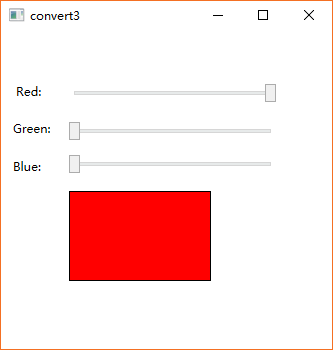
另一个典型应用是颜色混合。通过三个滑块分别控制红(R)、绿(G)、蓝(B)通道的值,实时预览混合后的颜色。
1. 实现颜色混合转换器
定义一个新的转换器,将接收到的三个字节值组合成一个SolidColorBrush。
using System;
using System.Globalization;
using System.Windows.Data;
using System.Windows.Media;

namespace WpfApp.Converters
{
    public class ColorMixerConverter : IMultiValueConverter
    {
        public object Convert(object[] values, Type targetType, object parameter, CultureInfo culture)
        {
            if (values == null || values.Length < 3)
                return Brushes.Transparent;

            try
            {
                byte redChannel = System.Convert.ToByte(values[0]);
                byte greenChannel = System.Convert.ToByte(values[1]);
                byte blueChannel = System.Convert.ToByte(values[2]);

                Color mixedColor = Color.FromRgb(redChannel, greenChannel, blueChannel);
                return new SolidColorBrush(mixedColor);
            }
            catch
            {
                // 处理转换异常,返回透明或默认颜色
                return Brushes.Transparent;
            }
        }

        public object[] ConvertBack(object value, Type[] targetTypes, object parameter, CultureInfo culture)
        {
            throw new NotSupportedException();
        }
    }
}
2. XAML 界面布局与绑定
使用Rectangle作为颜色预览区域,将其Fill属性通过MultiBinding绑定到三个RGB滑块上。
<Window x:Class="WpfApp.ColorMixerWindow"
        xmlns="http://schemas.microsoft.com/winfx/2006/xaml/presentation"
        xmlns:x="http://schemas.microsoft.com/winfx/2006/xaml"
        xmlns:conv="clr-namespace:WpfApp.Converters"
        Title="RGB调色板" Height="350" Width="400">


    <Grid Margin="20">

            <RowDefinition Height="Auto"/>
            <RowDefinition Height="Auto"/>
            <RowDefinition Height="Auto"/>
            <RowDefinition Height="*"/>


            <ColumnDefinition Width="Auto"/>
            <ColumnDefinition Width="*"/>


        <TextBlock Text="Red (R):" VerticalAlignment="Center" Margin="0,0,10,15"/>
        <Slider x:Name="SliderRed" Grid.Column="1" Minimum="0" Maximum="255" Value="128" Margin="0,0,0,15"/>

        <TextBlock Text="Green (G):" Grid.Row="1" VerticalAlignment="Center" Margin="0,0,10,15"/>
        <Slider x:Name="SliderGreen" Grid.Row="1" Grid.Column="1" Minimum="0" Maximum="255" Value="128" Margin="0,0,0,15"/>

        <TextBlock Text="Blue (B):" Grid.Row="2" VerticalAlignment="Center" Margin="0,0,10,15"/>
        <Slider x:Name="SliderBlue" Grid.Row="2" Grid.Column="1" Minimum="0" Maximum="255" Value="128" Margin="0,0,0,15"/>

        <Rectangle Grid.Row="3" Grid.ColumnSpan="2" Stroke="LightGray" StrokeThickness="1" Margin="0,10,0,0">

                <MultiBinding Converter="{StaticResource ColorMixerCvt}">
                    <Binding Path="Value" ElementName="SliderRed" />
                    <Binding Path="Value" ElementName="SliderGreen" />
                    <Binding Path="Value" ElementName="SliderBlue" />
                </MultiBinding>

        </Rectangle>
    </Grid>
</Window>
