Linux环境下GCC/G++安装与Makefile自动化构建实践
GCC与G++编译器的部署与标准配置
在Linux系统中,部署C/C++编译环境通常通过包管理器完成。对于基于RPM的系统(如CentOS/RHEL),可以使用以下指令安装GCC和G++:
sudo yum install -y gcc
sudo yum install -y g++
安装完成后,可通过 gcc --version 或 g++ --version 验证当前环境版本。若系统默认版本较旧(例如4.8.5),在编译时可通过附加标准参数来启用新特性。例如,使用 -std=c99 启用C99标准,或使用 -std=c++11 启用C++11语法支持:
gcc -std=c99 main.c -o main
g++ -std=c++11 app.cpp -o app
Make工具与Makefile核心语法
Makefile 是定义项目构建规则的核心文件,它描述了文件之间的依赖关系以及相应的构建指令。
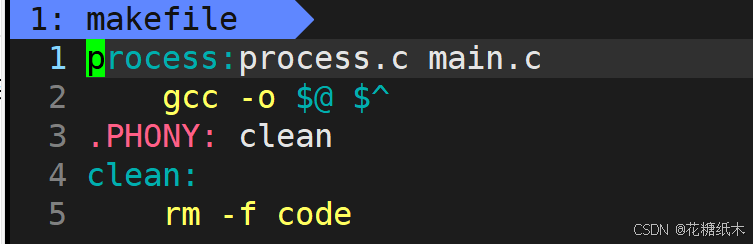
一个标准的Makefile规则由目标(Target)、依赖(Prerequisites)和配方(Recipe)组成:
- 目标:冒号左侧的内容,通常是期望生成的可执行文件或目标文件。
- 依赖:冒号右侧的内容,表示生成目标所需的源文件或头文件。
- 配方:第二行及之后的缩进命令,描述了如何从依赖生成目标。
在配方中,常使用自动化变量来简化编写:
$@:代表当前规则的目标文件名。$^:代表当前规则的所有依赖文件列表。
此外,Makefile 支持变量赋值,以提升脚本的可维护性。
对于不生成实际物理文件的规则(如清理编译产物),必须使用 .PHONY 声明为伪目标。这能有效防止因工作目录中存在同名文件而导致命令被跳过的问题。建议将所有非文件生成的目标均标记为 .PHONY。
.PHONY: clean
clean:
	rm -f *.o $(TARGET)
make 命令则负责解析 Makefile,并根据文件的时间戳自动判断哪些目标需要重新编译,从而高效执行构建任务。
实战:基于Makefile构建动态进度条程序
以下通过一个模拟文件下载的动态进度条项目,演示如何组织代码并使用 Makefile 进行自动化编译。
1. Makefile 构建脚本
TARGET = download_simulator
SRCS = main.c progress_bar.c
CC = gcc
CFLAGS = -std=c99 -Wall -O2

$(TARGET): $(SRCS)
	$(CC) $(CFLAGS) -o $@ $^

.PHONY: clean run
clean:
	rm -f $(TARGET)

run: $(TARGET)
	./$(TARGET)
2. 进度条模块头文件 (progress_bar.h)
#ifndef PROGRESS_BAR_H
#define PROGRESS_BAR_H

void render_progress(double total_bytes, double downloaded_bytes);

#endif
3. 进度条渲染逻辑 (progress_bar.c)
#include <stdio.h>
#include <string.h>
#include "progress_bar.h"

#define BAR_WIDTH 50
#define FILL_CHAR '='
#define SPINNER_CHARS "|/-\\"

void render_progress(double total_bytes, double downloaded_bytes) {
    double ratio = downloaded_bytes / total_bytes;
    double percentage = ratio * 100.0;

    char bar[BAR_WIDTH + 1];
    memset(bar, ' ', sizeof(bar));
    bar[BAR_WIDTH] = '\0';

    int filled = (int)(ratio * BAR_WIDTH);
    for (int i = 0; i < filled; i++) {
        bar[i] = FILL_CHAR;
    }

    int spinner_index = ((int)percentage) % strlen(SPINNER_CHARS);
    char spinner = SPINNER_CHARS[spinner_index];

    printf("\r[%-50s] %5.1f%% %c", bar, percentage, spinner);
    fflush(stdout);
}
4. 主程序与模拟下载逻辑 (main.c)
#include <stdio.h>
#include <stdlib.h>
#include <time.h>
#include <unistd.h>
#include "progress_bar.h"

#define TOTAL_FILE_SIZE 4096.0
#define BASE_CHUNK_SIZE 0.5

void simulate_network_download() {
    double current_downloaded = 0.0;

    while (current_downloaded < TOTAL_FILE_SIZE) {
        int random_factor = (rand() % 15) + 1;
        double chunk = random_factor * BASE_CHUNK_SIZE;
        current_downloaded += chunk;

        if (current_downloaded > TOTAL_FILE_SIZE) {
            current_downloaded = TOTAL_FILE_SIZE;
        }

        render_progress(TOTAL_FILE_SIZE, current_downloaded);
        usleep(30000);
    }
    printf("\n");
}

int main() {
    srand((unsigned int)time(NULL));
    simulate_network_download();
    return 0;
}