使用Java进行Elasticsearch索引管理
索引创建
/**
 * 创建新索引
 * */
@Test
public void establishNewIndex(){
    // 创建索引
    CreateIndexResponse response = esClient.admin().indices().prepareCreate("product_index").get();
    System.out.println(response.toString());

}
默认情况下创建的索引没有映射配置
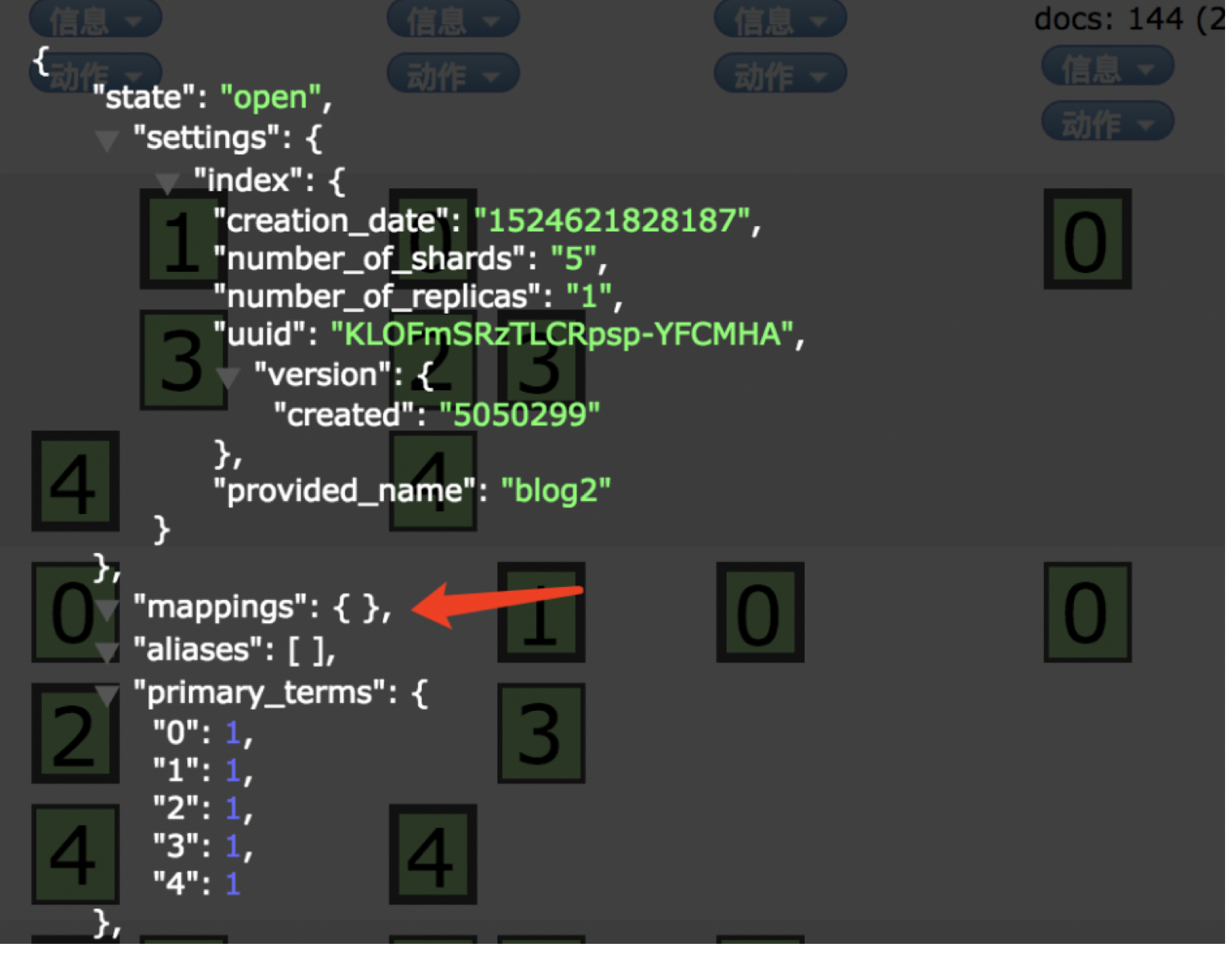
索引删除
/**
 * 删除指定索引
 * */
@Test
public void removeIndex(){
    // 删除索引
    esClient.admin().indices().prepareDelete("product_index").get();
}
索引映射配置
为什么需要手动定义映射?
在实际应用中,经常会出现数据精度丢失的问题,这通常是由于没有正确设置索引映射或完全没有进行映射配置导致的<br></br>Elasticsearch初次索引文档X时,其中的某个字段是整数类型;通过自动类型检测,系统将其设置为整型(integer);<br></br>随后在索引另一个文档Y时,Y文档在同一字段中存储了浮点型数值;此时elasticsearch会自动截断小数部分,仅保留整数部分;<br></br>这会导致数据不准确!<br></br>
如果你熟悉SQL数据库,应该知道在存储数据前需要创建模式来描述数据结构;尽管elasticsearch是一个无模式的搜索引擎,可以自动推断数据结构;
但我们仍然认为由自己控制并明确定义数据结构更为合理;在实际生产环境中,我们通常也会手动创建映射;
注意:创建映射时,索引必须已存在
{
"settings":{
   "shards":3,
   "replicas":1
},
"mappings":{
   "product_info":{
       "dynamic":"strict",
       "properties":{
           "productId":{"type": "string", "store": true},
           "productName":{"type": "string","store": true,"index" : "analyzed","analyzer": "ik_max_word"},
           "category":{"type": "string","store": true},
           "price":{"type": "double","store": true},
           "publishDate":{"type": "date","store": true},
           "manufacturer":{"type": "string","store": true},
           "description":{"type": "string","store": true,"index" : "analyzed","analyzer": "ik_max_word"},
           "inStock": {"type": "boolean", "index": "not_analyzed"}
       }
    }
}
1):创建索引基础结构
/**<br></br> * 创建新索引<br></br> * */<br></br>@Test<br></br>public void setupIndex(){<br></br> <br></br> CreateIndexResponse result = esClient.admin().indices().prepareCreate("book_catalog").get();<br></br> System.out.println(result.toString());<br></br><br></br>}<br></br><br></br>
2):通过代码配置索引映射(包含错误处理)
/**<br></br> * 索引映射配置类<br></br> */<br></br>public class IndexMappingConfig {<br></br> public static void configureMapping() throws UnknownHostException {<br></br> TransportClient client = null;<br></br> Map<String, Integer> shardConfig = new HashMap<String, Integer>();<br></br> shardConfig.put("number_of_shards", 3);<br></br> shardConfig.put("number_of_replicas", 1);<br></br> Settings settings = Settings.builder()<br></br> .put("cluster.name", "production_cluster")<br></br> .build();<br></br> client = new PreBuiltTransportClient(settings)<br></br> .addTransportAddress(new InetSocketTransportAddress(InetAddress.getByName("node01"), 9300));<br></br> System.out.println("========集群连接成功=============");<br></br><br></br><br></br> XContentBuilder mappingBuilder = null;<br></br> try {<br></br> mappingBuilder = jsonBuilder()<br></br> .startObject()<br></br> .startObject("book_info").field("dynamic", "true")<br></br> .startObject("properties")<br></br> .startObject("isbn").field("type", "string").field("store", "yes").endObject()<br></br> .startObject("title").field("type", "string").field("store", "yes").field("analyzer", "ik_max_word").endObject()<br></br> .startObject("author").field("type", "string").field("store", "yes").endObject()<br></br> .startObject("price").field("type", "double").field("store", "yes").endObject()<br></br> .startObject("publishDate").field("type", "date").field("store", "yes").endObject()<br></br> .startObject("publisher").field("type", "string").field("store", "yes").endObject()<br></br> .startObject("summary").field("type", "string").field("store", "yes").field("analyzer", "ik_max_word").endObject()<br></br> .startObject("available").field("type", "boolean").field("store", "yes").field("index", "not_analyzed").endObject()<br></br> .endObject()<br></br> .endObject()<br></br> .endObject();<br></br> PutMappingRequest mappingRequest = Requests.putMappingRequest("book_catalog")<br></br> .type("book_info")<br></br> .source(mappingBuilder);<br></br> UpdateSettingsRequest settingsRequest = new UpdateSettingsRequest();<br></br> settingsRequest.settings(shardConfig);<br></br> client.admin().indices().updateSettings(settingsRequest).actionGet();<br></br> client.admin().indices().putMapping(mappingRequest).get();<br></br> } catch (Exception e) {<br></br> e.printStackTrace();<br></br> }<br></br> }<br></br>}<br></br><br></br>
如果对Elasticsearch有较深入的了解,应该知道以下规则:
当索引不存在时,可以同时指定分片数和副本数
当索引已存在时,只能修改副本数
因此,在创建索引时就应确定分片和副本配置:
1):创建索引时直接指定分片数和副本数
/**<br></br> * 创建带配置的新索引<br></br> * */<br></br>@Test<br></br>public void createConfiguredIndex(){<br></br> // 创建索引并设置配置<br></br> Map<String, Integer> indexConfig = new HashMap<String, Integer>();<br></br> indexConfig.put("number_of_shards", 5);<br></br> indexConfig.put("number_of_replicas", 2);<br></br> CreateIndexResponse indexResponse = esClient.admin().indices().prepareCreate("book_catalog").setSettings(indexConfig).get();<br></br> System.out.println(indexResponse.toString());<br></br><br></br>}
2):然后创建映射信息时,可以忽略分片数和副本数,直接进行索引映射配置:
/**<br></br> * 索引映射配置类<br></br> */<br></br>public class ConfigureMappings {<br></br> public static void setupMappings() throws UnknownHostException {<br></br> TransportClient client = null;<br></br> Settings settings = Settings.builder()<br></br> .put("cluster.name", "production_cluster")<br></br> .build();<br></br> client = new PreBuiltTransportClient(settings)<br></br> .addTransportAddress(new InetSocketTransportAddress(InetAddress.getByName("node01"), 9300));<br></br> System.out.println("========集群连接成功=============");<br></br><br></br><br></br> XContentBuilder builder = null;<br></br> try {<br></br> builder = jsonBuilder()<br></br> .startObject()<br></br> .startObject("book_info").field("dynamic", "true")<br></br> .startObject("properties")<br></br> .startObject("isbn").field("type", "string").field("store", "yes").endObject()<br></br> .startObject("title").field("type", "string").field("store", "yes").field("analyzer", "ik_max_word").endObject()<br></br> .startObject("author").field("type", "string").field("store", "yes").endObject()<br></br> .startObject("price").field("type", "double").field("store", "yes").endObject()<br></br> .startObject("publishDate").field("type", "date").field("store", "yes").endObject()<br></br> .startObject("publisher").field("type", "string").field("store", "yes").endObject()<br></br> .startObject("summary").field("type", "string").field("store", "yes").field("analyzer", "ik_max_word").endObject()<br></br> .startObject("available").field("type", "boolean").field("store", "yes").field("index", "not_analyzed").endObject()<br></br> .endObject()<br></br> .endObject()<br></br> .endObject();<br></br> PutMappingRequest mapping = Requests.putMappingRequest("book_catalog")<br></br> .type("book_info")<br></br> .source(builder);<br></br> client.admin().indices().putMapping(mapping).get();<br></br> } catch (Exception e) {<br></br> e.printStackTrace();<br></br> }<br></br> }<br></br>}<br></br><br></br>
