Taffy自动化测试平台基于Flask的Web界面开发
最近为Taffy测试框架创建了一个网页应用,支持用例管理、执行以及测试报告查看等功能。该应用兼容所有基于Taffy/Nose框架编写的自动化脚本,其他如unittest等单元测试框架编写的脚本只需少量调整即可使用。
项目实现细节
安装必要的库
pip install flask
pip install flask-bootstrap
pip install flask-wtf
pip install nose
pip install nose-html-reporting
对于nose-html-reporting插件,需将__init__.py文件编码改为utf-8,并在文件开头添加以下代码:
import sys
sys.setdefaultencoding("utf-8")
在_format_output方法中修改return语句为:
return o.decode('utf-8')
Bootstrap下载与集成
从Bootstrap官网下载最新版本,并选择dashboard模板进行集成。项目结构概述
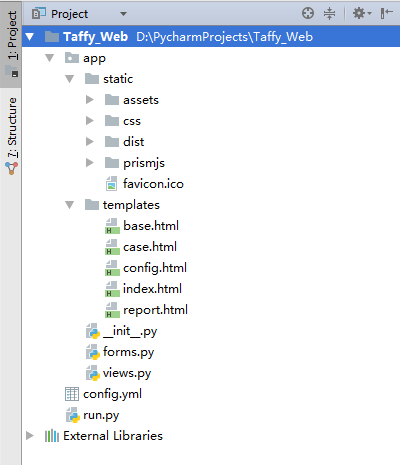
1) app目录包含静态资源和模板文件。
2) forms.py定义了表单配置。
3) views.py存放视图函数。
4) config.yml作为配置文件。
5) run.py用于启动应用。
核心代码解析
运行测试按钮绑定的JS方法runCase()
function executeTests() {
    var selectedCases = getSelectedCases();
    if(selectedCases === "") {
        alertMessage('未选择任何测试用例!', 'warning');
    } else {
        $('#execute-btn').prop('disabled', true);
        alertMessage('正在后台执行测试,请稍候...');
        $.post("/execute", {cases:selectedCases}, function(response){
            if (response.status == 0 || response.status) {
                alertMessage('测试完成,状态码:<strong>' + response.status + '</strong>. <a href="report" class="alert-link">点击查看详情</a>');
                refreshCaseList();
            } else {
                alertMessage(response.status, 'danger');
            }
            $('#execute-btn').prop('disabled', false);
        });
    }
}
views.py中的execute视图函数
@app.route("/execute", methods=["POST"])
def execute():
    cases = request.form.getlist("cases[]")
    result = {}
    try:
        formatted_cases = ' '.join(['"' + case + '"' for case in cases])
        config = yaml.safe_load(open(CONFIG_FILE))
        taffy_dir = config['taffy_directory']
        report_name = config['report_filename'] + '_{0}.html'.format(datetime.now().strftime('%Y%m%d_%H%M%S'))
        report_path = os.path.join(taffy_dir, 'Reports', report_name)
        command = f'nosestests -v {formatted_cases} --with-html --html-report="{report_path}"'
        result['status'] = os.system(command)

        if config['auto_email']:
            sendEmail(report_path)
    except Exception as e:
        result['error'] = f'测试失败:{str(e)}'
    return jsonify(result)
